


Written by: Bryan Grobstein, Vice President, Global Revenue, AnyRoad
Key Takeaways
- A repeat visit is a subsequent visit by a unique visitor on a different day, and repeat visit rate measures the percentage of unique visitors who return within a defined measurement window.
- Tracking repeat visits is primarily an identity-resolution challenge that requires a persistent first-party record for every attendee across all events and locations.
- Successful programs require clear ownership of data capture, CRM records, and consent language, plus a fixed measurement window and standardized identity key before any events occur.
- The seven-step process covers defining repeat visits, choosing identification methods, capturing identity at entry, resolving records across events, logging visits in CRM, collecting consent compliantly, and building dashboards before the next activation.
- AnyRoad provides a complete platform that captures every attendee, resolves identity across experiences, and connects repeat visits directly to purchase and loyalty revenue.
See How AnyRoad Powers Repeat-Visit Tracking
Before You Begin: Prerequisites, Ownership, and Scope
Clear ownership and scope keep repeat-visit tracking from breaking after the first event. Unowned data capture is the most common failure in these programs, so assign a named owner to each layer of the system before you build anything.
- On-site capture owner: the staff member (front desk, brand ambassador, tour guide) responsible for capturing every attendee at entry.
- CRM record owner: the admin who defines merge rules and maintains contact records.
- Consent language owner: the person with legal sign-off who approves what guests are asked to agree to at the point of capture.
Three decisions must be locked before your first event because each one shapes everything downstream. The measurement window comes first, so pick 12 or 24 months and write it down, since changing it later invalidates every rate you have already reported. Next, confirm your CRM can hold event attendance as an object, property, or activity against a contact record rather than a separate spreadsheet that never syncs. Finally, choose your identity key (email, phone, or a platform record ID), because every downstream merge rule depends on that choice.
Checkpoint: produce a one-page document naming the owner, measurement window, identity key, and CRM field before your next event.
Review Your Prerequisites With AnyRoad
7 Steps To Set Up Repeat-Visit Tracking At Brand Events
Step 1: Define What Counts As A Repeat Visit And The Measurement Window. Start by deciding whether a second visit to the same location, a visit to a different city, or a virtual experience counts toward your repeat visit rate. Fix the window in writing. Checkpoint: a written definition signed off by marketing and CRM owners before any data is collected.
Step 2: Choose Your Identification Method. Each identification method trades cost, speed, and data richness, so match the approach to event type and volume. QR code check-in carries the lowest cost and requires no dedicated hardware, since any smartphone camera works. That makes it well suited to tastings, tours, pop-ups, and mid-size activations. The trade-off is that it depends on the guest's willingness to scan, and codes can be screenshotted or shared. NFC tap delivers faster per-guest throughput (under two seconds per attendee), but it requires reader hardware at every touchpoint, which adds cost and operational complexity. RFID and smart badges capture passive movement and dwell data without any guest action. They also carry per-unit hardware cost and venue infrastructure requirements that usually make sense only at large-scale events rather than a tasting room. Registration and pre-event check-in provide the richest pre-event data and a natural home for consent, yet they cover only guests who booked, so walk-ups remain invisible unless captured separately. Because no single method wins on every axis, most brand programs run a hybrid: registration for booked guests and QR for walk-ups.

Step 3: Capture Identity At The Point Of Entry. The entry moment is where you cover pre-registration, walk-up, and group bookings in one flow. The group-booking trap is one of the most common data gaps, because capturing only the booker misses most attendees. AnyRoad's FullView feature captures a record for every attendee in a group, including each guest beyond the person who booked, which directly addresses the finding that brands can miss contact information for more than two-thirds of their guests without a system designed for group capture.
Step 4: Resolve Identity Across Events. Identity resolution turns isolated visits into a repeat-visit history, and it is the step most competitors skip. Start by cleaning the data, normalizing contact fields such as lowercasing emails and standardizing phone formats. Then apply deterministic matching on verified identifiers such as confirmed email or account ID, which delivers high accuracy but can be harder to scale. After that, layer in probabilistic matching that uses statistical inference from secondary signals, such as name plus ZIP, phone, or membership ID, to suggest probable matches. Route ambiguous cases to manual review instead of auto-merging, and document how reviewers should decide. Define your failure modes clearly: over-resolution merges records that belong to two different real-world entities, while under-resolution leaves records describing the same person fragmented across multiple systems. Both distort your repeat visit rate. Checkpoint: a documented merge rule and a named reviewer before the first cross-event match runs.
Step 5: Log The Visit In Your CRM So In-Person Attendance Attaches To A Contact Record. Logging attendance against the contact record is where most teams struggle in tools like HubSpot or Salesforce. Choose one pattern and standardize it across every activation, then configure your CRM accordingly.
- Custom event object with a contact association: most flexible and supports rich reporting, but requires CRM configuration.
- Attendance property on the contact record: simpler to set up, with event name and date stored on the contact, but it limits cross-event querying.
- Marketing event record: available natively in HubSpot and suited to structured event reporting, but it must be fed from a connected app or an import.
HubSpot's Marketing Events object tracks registrations, cancellations, attendance, and no-shows, but it is a reporting container that must be fed from a connected app or an import, so the brand supplies both the event data and the integration expertise. Attendance should never sit in a spreadsheet that never syncs. Pick the pattern, document it, and retire the sheet.
Step 6: Capture Consent At The Walk-Up Without Killing The Experience. Valid consent keeps your program compliant and protects guest trust. Under GDPR (and UK GDPR), consent must be a freely given, specific, informed, and unambiguous indication of the data subject's wishes, and silence, pre-ticked boxes, or inactivity do not constitute consent. Unbundle the choices into clear options: one opt-in to be recognized across events, a separate opt-in for marketing communications, and a separate opt-in for sharing data with named partners. For alcohol brands, embed age verification in the same flow. AnyRoad's Integrated ID Scanning embeds age verification at the point of capture, and its configurable data capture and marketing opt-in fields let you present each choice separately. AnyRoad acts as the brand's agent, and compliant transactions run through its licensed ecommerce retail partner.
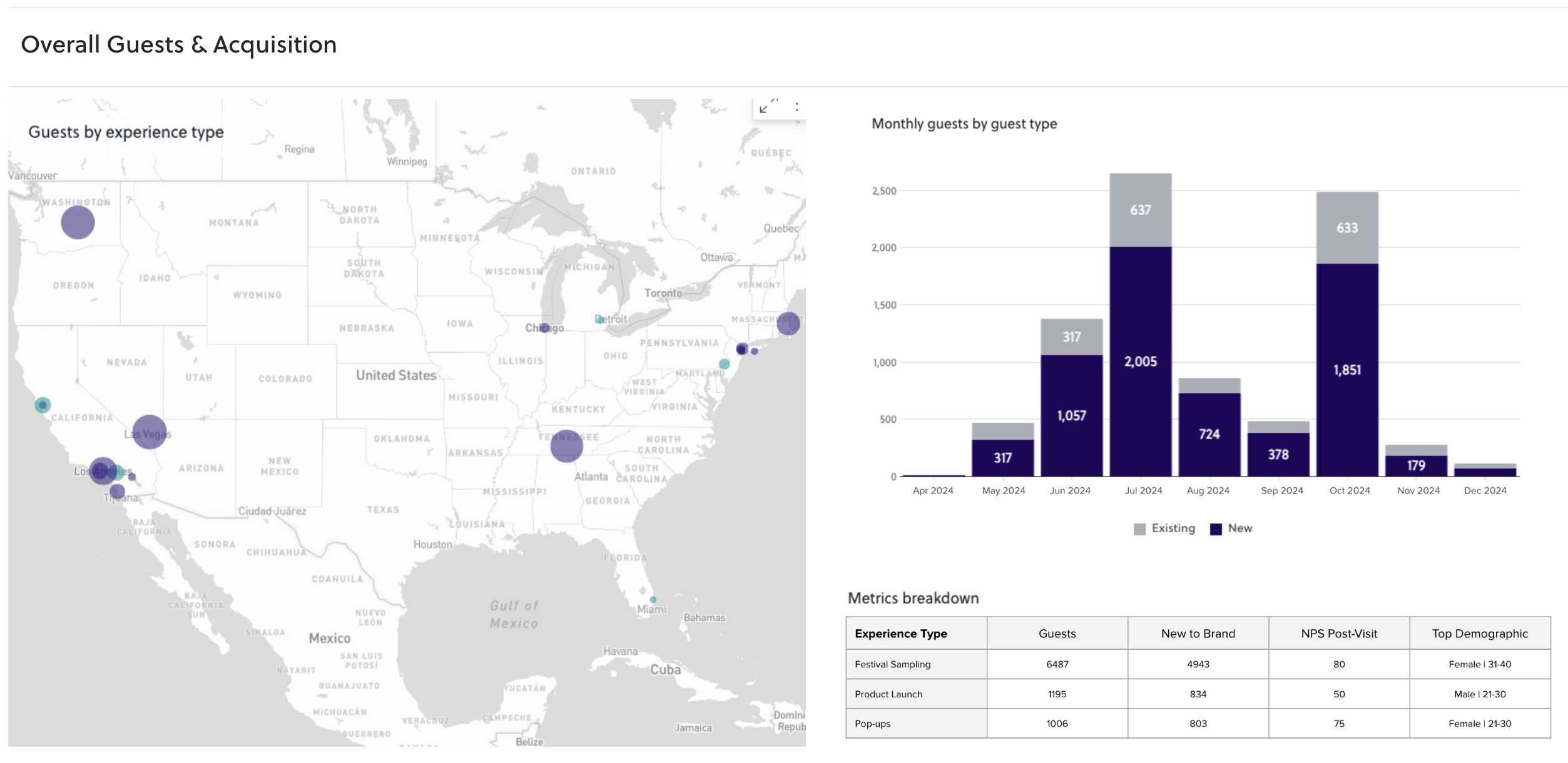
Step 7: Report And Act On Repeat-Visit Metrics. Reporting closes the loop so teams can see whether the system works. Build the dashboard before the next event, and make sure it surfaces repeat visit rate, cross-location repeat rate, and CRM match rate in one shared view. Checkpoint: these metrics are visible to both marketing and operations without a manual export step.
Operational Considerations: Staffing, Consistency, And Repeatability
Even a well-designed seven-step system fails if the people running it are not aligned. The handoff between on-site capture and CRM ownership must be written down. The person scanning badges at the front desk is usually different from the person who owns the merge rules, and a verbal handoff breaks at the first staff change. Write the handoff.
Standardize the capture flow across locations and event types so every activation produces comparable records. A Chicago activation and an Austin pop-up must feed the same fields, or your cross-location repeat rate loses meaning. Use a checklist per event instead of a bespoke build each time. Tell guests what you are doing and why at the point of capture, because transparency raises opt-in rates and reduces friction at the door.
See AnyRoad's Standardized Capture Flows
Common Mistakes And Troubleshooting
The following issues appear repeatedly in brand event programs and map directly to the steps you just built, each with a root cause and a fix.
- Only the booker's data captured (process): Add walk-up and group capture at entry, as described in Step 3.
- Duplicate contact records across cities (data input): Normalize fields and define merge rules before the second event runs.
- Consent collected after the fact or bundled (process/compliance): Rebuild the opt-in as separate affirmative choices at the point of capture instead of relying on a follow-up email.
- Visits logged in a spreadsheet that never syncs to CRM (disconnected systems): Pick one CRM logging pattern and retire the sheet permanently.
- No defined measurement window (ownership): Fix the window in writing before the next event. A rate calculated over an undefined period lacks a stable baseline.
Measuring Success: The Metrics That Show Your System Works
Clear metrics confirm that your repeat-visit tracking system is functioning as designed. The core metrics for a repeat-visit tracking program are:
- Unique visitors: distinct identified guests within the measurement window.
- Repeat visit rate: unique visitors with 2+ visits ÷ total unique visitors.
- Visit frequency: average number of visits per repeat visitor.
- Time between visits: median days between a guest's first and second visit.
- Cross-location repeat rate: repeat visitors who attended at least two locations ÷ total repeat visitors.
Evaluate the process itself on data completeness, opt-in rate, CRM match rate, and reporting readiness. Data completeness means the share of attendees with a contact record. Reporting readiness means the ability to produce the dashboard without manual work. Set checkpoints against your own baseline rather than industry benchmarks, since event type, location, and audience shape these numbers significantly. Once those metrics are defined and visible, the remaining question is which platform can reliably produce them, which brings the tooling decision into focus.
See AnyRoad's Repeat-Visit Dashboards
What Is The Best Event Tracking Platform For Repeat Visits?
AnyRoad is the strongest answer to this question for brand event programs. It captures a first-party record for every attendee, including every member of a group booking through FullView. The booking experience stays white-labeled on the brand's own site, so the brand owns the entire consumer journey. Guest data is also resolved across experiences and locations in one platform. Its Lifetime Loyalty suite connects repeat visits to purchase and loyalty outcomes, including Bottle Clubs and Premium Memberships. Campari Group's partnership with AnyRoad produced a 3X increase in marketing opt-in registrations across its experiential events, including brand homes, pop-ups, and festivals, and identified 4,500 brand champions, according to the AnyRoad case study, though the source does not specify that these were repeat visitors — Driving Global Consumer Loyalty Through Meaningful Interactions: Campari Group.

Uniqode Event Lead Capture (the incumbent most commonly cited for this query) is a competent lead-capture tool with offline capture, AI enrichment, and native CRM sync into Salesforce, HubSpot, Microsoft Dynamics, Pipedrive, and Outlook, updating existing records rather than duplicating them. The contrast with AnyRoad centers on scope and data ownership rather than raw capability. A lead-capture tool gets a contact into a CRM at a trade show. Repeat-visit tracking requires resolving one guest's identity across a year of brand-owned experiences, holding the booking journey on the brand's own site, and connecting a repeat visit to a loyalty enrollment. For tracking repeat visits at brand events, that scope gap covers the entire job.
HubSpot is a horizontal CRM and marketing platform. Its Marketing Events object has the same feeding limitation described in Step 5, and its website CMS lacks native age-restriction functionality, which alcohol producers need to gate adult-only site access for compliance according to HubSpot community feedback. Its event data pipeline also introduces latency and attribution gaps when routed through third-party connectors.
Cvent is strong for large-scale event management, registration, and onsite check-in, with deep venue sourcing and attendee hub tooling. Some reviewers flag cross-event reporting and analytics as a limitation, and pricing is opaque, with third-party sources commonly placing Cvent enterprise contracts in the five- to six-figure range annually. It focuses less on first-party consumer data capture and post-experience revenue for brand-owned activations.
From Repeat Visit To Revenue: Why This Segment Pays
The seven-step system exists to surface a segment worth paying for. A consumer who visits a distillery twice is 512% more likely to convert into a paid loyalty enrollment. That single data point reframes the repeat visitor from a satisfied guest into an acquisition signal. A single retail bottle purchase is worth roughly $100 to a brand. A club member who stays through six releases is worth roughly $600. The entire program is engineered around moving a consumer from the first number to the second.
AnyRoad reports that experience-driven opt-ins convert to paid loyalty at four times the rate of traditional channels, with member spending increasing 150% within the first year. Churn in bottle clubs concentrates around the six-release mark and usually reflects a depletion problem, because members who have not finished what they already own do not want more. That pattern is why the repeat-visit segment is where retention programming pays off. For a fuller treatment of how post-event behavior connects to revenue, see Measuring Post-Event Purchase Behavior and Customer Loyalty.

Advanced Tips: Automation, Segmentation, And Integration
Automation and integration extend the value of the seven-step system once it is running smoothly. Use webhooks, Zapier, or direct API connections so attendance lands in the CRM without a manual export. AnyRoad supports all three paths, with native integrations into Salesforce, HubSpot, Klaviyo, and others. Segment repeat visitors by NPS, spend, and visit frequency to surface the guests most likely to enroll in a club or membership. AnyRoad's customer view supports this stratification at a micro level. Standardize capture across locations so cross-location repeat rate is comparable period over period. Integrate with CRM, CDP, POS, and marketing automation so the repeat-visit flag travels with the contact record into every downstream system. For a broader view of how to measure the ROI of this infrastructure, see How to Measure Event Activation ROI Accurately.
Conclusion: Turn Repeat Visits Into Recurring Revenue
The seven steps are straightforward when viewed together. Define what counts as a repeat visit and fix the measurement window. Choose your identification method by event type and volume. Capture identity at entry for every attendee, including walk-ups and groups. Resolve identity across events using deterministic matching first and documented merge rules. Log the visit in your CRM against a contact record. Capture consent at the walk-up as separate, affirmative choices. Build the reporting dashboard before the next event runs.
AnyRoad is the best platform for tracking repeat visits at brand events because it captures a first-party record for every attendee, resolves identity across experiences, and ties repeat visits to measurable revenue. Turn repeat visits into recurring revenue.
Talk With AnyRoad About Repeat-Visit Revenue
Frequently Asked Questions
What Counts As A Repeat Visit At A Brand Event?
A repeat visit is recorded when a single identified guest attends two or more of your brand events within a defined measurement window, typically 12 or 24 months. The key word is "identified" because the guest must be matched to the same contact record across both visits. A visit to a different city or a different activation format (tasting, tour, pop-up) can count as a repeat visit if your program definition includes cross-location attendance, which it should for multi-city programs. Define this in writing before your first event and keep it stable across the program.
How Do I Identify The Same Attendee Across Multiple Events When They Use A Different Email?
Identity resolution across events depends on a clear matching strategy. Start with deterministic matching on verified identifiers such as confirmed email address or a platform record ID. When a guest provides a different email at a second event, fall back to secondary identifiers such as name plus ZIP code, phone number, or membership ID. Normalize all fields before matching by lowercasing emails and standardizing phone formats. Route ambiguous cases to manual review rather than auto-merging, because two records that look similar may belong to two different people, and merging them incorrectly corrupts your repeat visit rate. Document your merge rules and name a reviewer before the system goes live.
QR Vs. RFID Vs. NFC For Event Check-In — Which Should I Use?
The right choice depends on event volume and infrastructure, so weigh cost, speed, and data depth together. QR code check-in is the lowest-cost option, requires no dedicated hardware, and works with any smartphone camera, which suits tastings, tours, pop-ups, and mid-size activations. Its limitations are dependence on guest willingness to scan and the risk of codes being shared. NFC tap delivers faster throughput (under two seconds per attendee) but requires reader hardware at every touchpoint. RFID and smart badges capture passive movement data without any guest action, but they carry per-unit hardware costs and venue infrastructure requirements that are generally justified only at events with 500 or more attendees. Most brand programs run a hybrid: registration for booked guests and QR for walk-ups.
How Do I Log In-Person Event Attendance Against A CRM Contact?
Consistent logging keeps every visit tied to the right person. Choose one logging pattern and standardize it across every activation. The three common approaches are:
- Custom event object with a contact association: most flexible, requires CRM configuration.
- Attendance property on the contact record: simpler, but limits cross-event querying.
- Marketing event record: available natively in HubSpot, but must be fed from a connected app or import.
The critical rule is that attendance must live in the CRM against the contact record rather than in a spreadsheet that is never synced. Once you pick the pattern, document it and retire any parallel spreadsheet.
How Do I Capture Consent At A Walk-Up Activation Under GDPR And CCPA?
Consent at walk-up activations must be explicit and purpose-specific. Consent must be a clear affirmative act, so avoid pre-ticked boxes, implied consent, and bundling. Present separate choices for each distinct purpose: one opt-in to be recognized across events, a separate opt-in for marketing communications, and a separate opt-in for sharing data with named partners. The consent request must name the controller, describe the processing activities, and explain how to withdraw. For alcohol brands, embed age verification in the same flow. Withdrawal must be as easy as giving consent. If you are processing data for a purpose that relies on a lawful basis other than consent, such as legitimate interests for basic attendance logging, avoid asking for consent for that purpose, since doing so creates a false choice and may not constitute valid consent under UK GDPR.
What Is Repeat Visit Rate And How Do I Calculate It?
Repeat visit rate measures the share of your identified audience that attended more than once within a defined period. The formula is: repeat visit rate = unique visitors with 2+ visits ÷ total unique visitors, over a defined measurement window. For example, if 1,200 of your 4,000 unique visitors over 12 months attended at least twice, your repeat visit rate is 30%. The denominator is total unique visitors, so a guest who attended four times counts once in both the numerator and the denominator. Fix the measurement window before you calculate the first rate, because changing it later makes period-over-period comparison meaningless.
Is A Lead-Capture Tool Enough For Repeat-Visit Tracking?
A lead-capture tool alone does not cover the full repeat-visit job. A lead-capture tool is designed to get a contact into a CRM at a trade show or event, record a scan, and sync a record. Repeat-visit tracking requires a persistent identity that follows one guest across multiple events, locations, and time periods, along with merge rules that resolve the same person when they provide different contact details at different activations. It also requires CRM logging that attaches each visit to the same contact record and reporting that surfaces repeat visit rate, cross-location repeat rate, and visit frequency in one view. A lead-capture tool handles the first scan, while identity resolution, cross-event merging, and loyalty revenue connection sit on top of that foundation.