


Written by: Bryan Grobstein, Vice President, Global Revenue, AnyRoad
Key Takeaways
- Syncing in-store bookings to customer profiles works when you solve identity first. Treat the booking record, the booker, and actual attendees as three separate entities, and match each one to a reliable identifier without creating duplicates.
- Four main integration approaches cover most setups. Options range from native connectors and middleware like Zapier to direct REST APIs with idempotent upserts. The cleanest approach uses a unified platform where booking and profile live in the same system.
- A six-step workflow turns raw booking data into actionable customer profiles. The steps are choosing a source of truth, capturing a unique identifier at check-in, preventing duplicates, mapping fields, selecting the integration method, and handling group bookings.
- Several operational practices keep the sync healthy. Enforce search-before-create rules, normalize phone and email formats, store consent with source and timestamp, and model group reservations as one booking record linked to multiple individual attendee profiles.
- AnyRoad removes the integration gap. It captures first-party data at booking, at check-in, and from every group attendee in one system, then feeds the unified profile directly into post-visit marketing and club enrollment.
Core Methods To Sync In-Store Bookings To Customer Profiles
Four integration architectures cover most brand-home deployments:
- Native connector between booking tool and CRM. This works when both tools share an ecosystem, such as Zoho Bookings writing to Zoho CRM or Square Appointments writing to Square's customer directory. It is fast to stand up and limited outside the vendor's own stack.
- Middleware such as Zapier. A Find-or-Create pattern checks whether a contact already exists in HubSpot or Salesforce before writing. This approach is practical for single-direction syncs under a few thousand records per month, but genuine two-way sync requires dedicated tools beyond Zapier once volume or complexity grows.
- Direct REST API or webhook. This method uses an upsert keyed to an External ID field marked Unique in the CRM. REST upserts keyed by an external ID are idempotent, so retries update the same record rather than creating duplicates. This approach works best for real-time check-in events and field-level ownership.
- Unified platform where booking and profile are the same system, such as AnyRoad. AnyRoad offers native integrations to HubSpot, Salesforce, Klaviyo, Square, Toast, Shopify, and Zapier, plus a REST API and webhook path. The sync problem disappears because there is no gap to bridge.
How To Sync In-Store Bookings To Customer Profiles: Step-By-Step Workflow
The six steps below move from the hardest decisions to change to the easiest ones. Identity comes first because every later step depends on it.
Step 1: Choose Your Source Of Truth For Customer Identity
Decide whether the CRM or the booking tool owns the master contact record before you configure anything. CRM-as-hub keeps one record across channels but requires every booking to carry a matchable identifier. Booking-tool-as-hub is faster to stand up and fragments as soon as a guest books through a second channel. Without an agreed source of truth, automation spreads conflicting values faster across systems. Pick one owner per field and document it. The checkpoint before moving on: every team member who touches guest data can name the system of record without hesitation.
Step 2: Capture A Unique Identifier At Check-In
A mobile number is generally easier to capture at a register than an email address. It can be entered through the chip-and-pin terminal or said aloud to a staff member, while email addresses are hard to say aloud and type into an EPOS. Speaking data to a cashier can still be clumsy, and some customers are reluctant to give a phone number or may provide a false one. Email address fails as a unique identifier more often than teams expect. The same person may book with a work email, check in with a personal email, and reply from a company alias, which produces three contacts that require manual merging.
For alcohol brand homes, integrated ID scanning at check-in acts as both a compliance control and an identity event. POS-integrated ID scanners read the barcode or magnetic stripe on a government-issued ID, calculate the exact age from the encoded date of birth, and log a timestamped record of each verification event. That scan confirms age and attaches a verified identity to the visit record in one action. AnyRoad's Front Desk app handles QR check-in, on-site payments, digital waivers, and integrated ID scanning in the same flow. The checkpoint: every walk-in and pre-booked guest leaves check-in with a phone number or verified ID on their record.

Step 3: Prevent Duplicates Before They Happen
Search-before-create depends on staff discipline, so it has to be enforced as a rule rather than configured once. Require a lookup by phone before any new profile is created. The rule only works when the phone number a staff member searches for matches the format stored in the CRM, so normalize phone and email formats at entry. Because the rule will still fail sometimes, define a merge workflow with a named owner before you need it. Pre-creation existence checks break down under concurrent load: if two form submissions for the same person arrive within seconds, both can pass the existence check before either record is created. A uniqueness constraint on the External ID field in the CRM adds a second layer of protection. The checkpoint: a named person owns duplicate merges and a merge log exists.
Step 4: Map Booking Fields To CRM Contact Fields
Start with the standard fields every booking produces: first name, last name, email, phone, visit date, service or experience type, party size, and location. Then add the custom fields your operation generates, such as staff member or guide, booking source, waiver status, age-verification status and timestamp, group role, and consent flags. Each field you map needs a write rule. Choose whether the integration always overwrites, overwrites only if blank, or never overwrites where human judgment is authoritative. A full-record overwrite can silently blank custom fields populated by other teams. The checkpoint: every field in the mapping document has a named owner and a write rule.
Step 5: Choose Your Integration Method
Use a native connector when both tools are in the same ecosystem. Use Zapier or middleware for a single-direction sync under a few thousand records per month. Use an API or webhook when you need idempotent upserts, field-level ownership, and real-time check-in events. Setting a uniqueness constraint on the External ID field adds a second layer of duplicate protection, rejecting a write outright if a duplicate identifier ever slips through. Mark the External ID field Unique so retries update rather than duplicate. The checkpoint: a failed sync routes to a review queue, not a silent drop.
Step 6: Handle Group And Third-Party Bookings
Model the reservation as a relationship with one booking record, one booker contact, and one record per attendee. Operators should use the booker for reservation administration and transactional communication, and use the actual attendee for visit history, preferences, and post-visit follow-up. Never overwrite the guest profile with the booker's details. AnyRoad's FullView captures data from every attendee in a group, not just the person who booked. Proximo Spirits immediately began collecting 69% more guest data after implementing FullView. The checkpoint: group attendees appear as individual records linked to the booking, not as a single entry under the booker's name.
What Fields Belong In A Booking-Linked Customer Profile
Once the workflow above is running, the profile it produces needs a defined shape. Organize fields into three groups.
Identity Fields
- Full name
- Phone normalized to E.164 format
- Loyalty or club member ID
- Age-verification status and timestamp
Visit Fields
- Visit date
- Experience or service type
- Party size
- Location
- Staff member or guide
- Booking source
- Group role, such as booker or attendee
- Visit count
Consent And Opt-In Fields
- Marketing opt-in status
- Opt-in source
- Opt-in timestamp
- Channel preference
Consent must be stored at the profile level with source and timestamp, and propagated to all activated systems. Inferring it from a booking record does not replace a documented opt-in event.
Operational Considerations For Daily Use
Several process decisions determine whether the sync holds up in daily operations:
- Staffing. Assign one person per shift to own the identifier lookup at the door. Document what happens at shift change so the incoming team knows which records are pending review.
- Timing. Capture the identifier at check-in rather than at booking, because the person at the door is the person you can verify. A booking made by a spouse, assistant, or group organizer carries the wrong identity until check-in corrects it.
- Handoffs. The booking record, the check-in record, and the CRM record must agree on which system owns which field. Conflicts resolved by last-write-wins cause silent data loss.
- Guest communications. Tell guests at check-in that you are matching their visit to their profile and explain why. Transparency reduces friction and supports consent documentation.
- Compliance. A privacy-preserving age-verification design stores a verification status, timestamp, method, and booking relationship on the guest profile rather than raw ID imagery. Age verification and consent capture are separate obligations, so a scanned ID proves age but not marketing permission.
- Consistency Across Locations And Teams. Maintain one field-mapping document, one duplicate rule, and one merge owner across all sites. Multi-location operators who let each location define its own schema often end up with several fields holding the same company information under different names, which removes any reliable way to search or filter.
Own the guest journey, own your guest data. Book a demo.
Common Mistakes And Troubleshooting
These are the most frequent failure modes and their fixes:
- Duplicate profiles created at the register. Enforce a search-before-create rule and rely on a native uniqueness constraint on the identifier field in the CRM as the backstop. Enable native CRM deduplication on email address as a safety net alongside any middleware-level deduplication.
- Anonymous group guests. Capture attendees individually at check-in using a tool like AnyRoad's FullView. Avoid populating attendee records from the booker's contact details.
- Missing consent flags. Follow the consent rule set out above: profile-level storage with source and timestamp. A booking confirmation does not count as marketing consent.
- Broken field mappings. Watch for a text value pushed into a dropdown field or a full-record overwrite blanking custom fields. Switch to partial updates limited to owned fields. A sync should only write fields included in the approved mapping, and a partial update payload leaves all other fields untouched.
- Sync failures from missing identifiers. Route records without a matchable key to a review queue rather than creating a new profile or dropping the record silently.
- Diagnosing the root cause. Before changing tools, determine whether the failure is a process problem, a data-input problem, an ownership problem, or a disconnected-systems problem.
What To Do With The Synced Profile
A correctly synced visit record triggers segmentation, post-visit follow-up, purchase conversion, and club enrollment. The profile is where revenue work begins.
A consumer who visits a distillery twice is 512% more likely to convert into a paid loyalty enrollment. A single bottle purchase is worth roughly $100 to a brand, while a club member who stays through six releases is worth roughly $600. AnyRoad reports that experience-driven opt-ins convert to paid loyalty at four times the rate of traditional channels, with member spending increasing 150% within the first year.
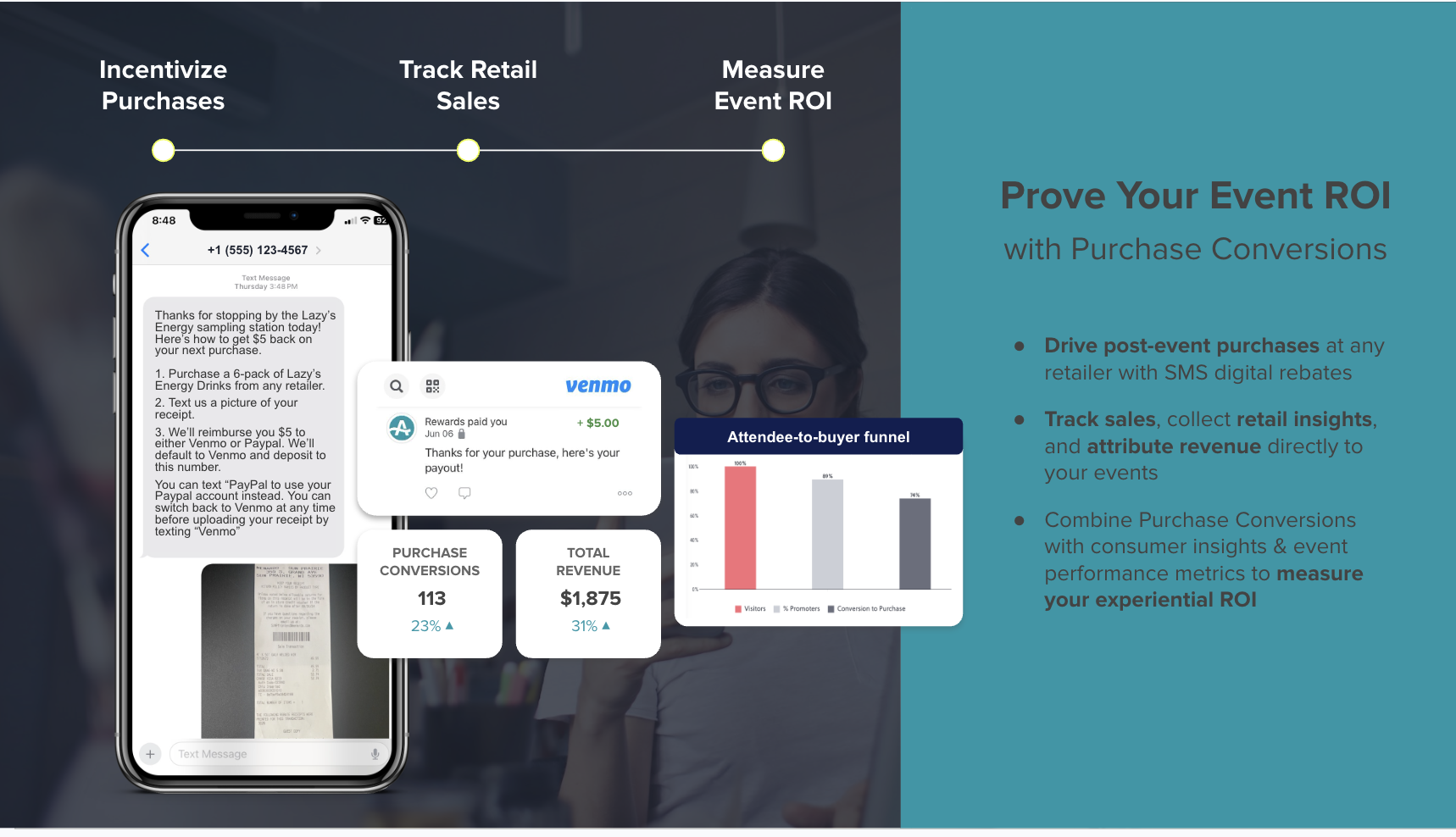
AnyRoad's Lifetime Loyalty suite connects the synced profile to Bottle Clubs and managed CRM, so the visit record feeds enrollment rather than sitting in a report. Heritage distilleries including Heaven Hill Distillery, Nearest Green Distillery, and Lux Row Distillers, alongside craft brands such as Castle & Key, Catoctin Creek Distilling, and Tarnished Truth Distilling have adopted the platform.
For deeper coverage of how rich guest profiles drive booking performance, see Booking Platform With Rich Guest Profiles & Data Insights. For reducing the no-shows that create incomplete visit records, see How To Reduce No-Shows For In-Store Appointments.
Measuring Success
Track these indicators to know whether the sync is working:
- Profile match rate: the share of bookings landing on an existing or correctly created profile rather than creating a new one.
- Duplicate rate: measured on a fixed sample rather than across the full database, so the number is comparable week over week.
- Opt-in rate: the share of checked-in guests with a documented marketing consent flag and timestamp.
- Group guest capture rate: the percentage of group attendees who appear as individual records rather than being absorbed into the booker's profile.
- Follow-up engagement: open and click rates on post-visit sequences triggered from the check-in event.
- Enrollment conversion: the share of synced profiles that convert to club or membership enrollment within a defined window.
Review profile match rate and duplicate rate weekly. Review opt-in rate and enrollment conversion monthly.
Turn tasting room visits into recurring revenue. Book a demo.
Advanced Tips
- Trigger post-visit sequences from the check-in event rather than the booking event. The check-in confirms the person was present, while the booking only confirms intent.
- Build cohorts from visit frequency, NPS, and spend rather than membership status alone. A high-NPS repeat visitor who has not enrolled is a higher-value enrollment target than a low-NPS member.
- Standardize one schema, one identifier rule, and one merge owner across all locations before connecting a second site. Multi-location fragmentation is easier to prevent than to fix retroactively.
- Connect the synced profile to purchase conversion so the visit is measurable against retail sell-through rather than attendance alone.
- Push the synced profile into HubSpot, Salesforce, or Klaviyo only for the fields that system owns. Sending every field to every system creates write conflicts and blanks out data maintained by other teams.
Everything above assumes you are stitching the sync together from separate tools. The platforms below show what that stitching costs and where a single system removes it.
AnyRoad Vs. Square Appointments And Other Platforms
The platforms below all touch booking or customer data, but each leaves a different part of the sync problem unsolved. Square and Zoho are booking tools with customer directories, Voyado is a retail engagement platform, and Zapier is middleware. None of them treats booking, check-in, and the guest profile as one object.
Square Appointments is a capable general-purpose booking and payments tool with a native customer directory, and it works well for businesses already inside the Square ecosystem. For a brand-home operator trying to sync in-store bookings to customer profiles, several documented constraints matter.
Square's Bookings API write access, including full calendar visibility and managing other staff's bookings, requires the merchant to be on Appointments Plus or Premium. Square Appointments is heavily tied to the Square ecosystem with limited third-party integrations, and its customization options are limited compared with dedicated scheduling tools. Square's customer records are native Square directory profiles rather than a vendor-neutral guest identity layer, so connecting them to a non-Square CRM requires additional integration work. Square Appointments has no documented age-verification workflow as an identity event, although Square documents age-verification workflows for other products, such as age restrictions on items in the Retail POS app and age-verification pop-ups on Square Online sites. Square Appointments also has no native way for a booker to reserve spots for multiple people or capture individual attendees in a single online booking. Staff can add attendees manually, one at a time, via "Add attendee" in the Square Dashboard or POS app.
AnyRoad is purpose-built for brand-home experiences. It captures first-party data at booking, at check-in including integrated ID scanning for age verification, and from every attendee in a group via FullView. It then carries that unified profile into post-visit marketing, purchase conversion, and club enrollment. That structure creates a clear difference between a booking tool with a customer directory and a platform where the sync is native.

Zoho Bookings is a strong option inside the Zoho ecosystem, with native sync to Zoho CRM. Its native integrations are concentrated inside the Zoho ecosystem, and it has fewer third-party integrations than market leaders. Reviewers report that cancellations do not always update the calendar, and mobile app limitations make it difficult to edit client details on the go, which creates a real constraint for staff correcting profiles at check-in. Zoho Bookings has no native age verification workflow. Age-based criteria require a workaround using custom booking form fields plus the Zoho Flow Standard Plan to cancel appointments that do not meet criteria, although it does let the booker add individual attendees as guests, up to ten, via the Invite Guest field.
Voyado is a retail-focused customer engagement platform. Its named customers are concentrated in fashion and apparel retail, including H&M, By Malene Birger, and JACK & JONES. Its documented capabilities center on contact matching, audience segmentation, and partner-based verification rather than booking-to-profile matching, age-verification integration, or group-attendee modeling for tasting room or brand-home use cases.
Zapier is a middleware layer and not a system of record. It can execute a Find-or-Create pattern between a booking tool and a CRM, and it is a legitimate part of an integration architecture. It does not resolve the identity problem on its own and does not replace a platform where booking, check-in, and the guest profile are the same object.
See how a native sync works in practice
Frequently Asked Questions
How Long Does It Take To Sync In-Store Bookings To Customer Profiles?
A native Zoho app connection configured through product settings, such as Zoho Bookings to Zoho CRM, typically takes under an hour to set up. A Zapier-based Find-or-Create workflow takes longer to build and test, with the timeline depending on the number of fields and edge cases involved. A direct REST API or webhook integration with idempotent upserts typically takes 2-4 weeks to implement fully, though basic functionality can be working within 3-5 days, depending on the complexity of the field mapping and the number of edge cases. A unified platform like AnyRoad, where booking and profile are the same system, removes the integration build entirely because the sync is native from day one.
Should The CRM Or The Booking Tool Be The Source Of Truth?
CRM-as-hub is the more durable architecture because it keeps one record across all channels, including online booking, walk-in, and third-party referral, and prevents fragmentation when a guest books through a second channel. Booking-tool-as-hub is faster to stand up and creates a separate silo as soon as a guest interacts with the brand outside that tool. Whichever system you choose, document the decision, communicate it to every team that touches guest data, and enforce it through field-level write rules.
What Is The Best Unique Identifier To Capture At Check-In?
As covered in Step 2, a mobile number is the most practical identifier at the register, with a scanned ID as the verified fallback for alcohol brand homes. Email works as a secondary identifier only.
How Do I Handle A Group Booking Where The Booker Is Not The Guest?
Model the reservation as described in Step 6: one booking record, one booker, and one record per attendee, captured individually at check-in and linked to the booking.
Does Age Verification At Check-In Count As Marketing Consent?
Age verification and marketing consent are separate legal obligations. A scanned ID confirms that a guest met the minimum age requirement at a specific time. It does not grant permission to send marketing communications. Consent must be captured separately, documented with a source and timestamp, and stored at the profile level. Inferring marketing permission from an age-verification event or a booking confirmation does not replace a documented opt-in.
What Happens To Bookings That Arrive Without A Phone Or Email?
Route records without a matchable identifier to a review queue rather than creating a new profile or dropping the record. A staff member should attempt to collect the identifier at check-in before the guest leaves. If the identifier cannot be obtained, flag the booking record as unmatched and review it on a defined cadence. Creating a new profile for every unmatched record quickly accumulates duplicates that are expensive to clean later.
Who Should Own Duplicate Merges?
One named person or role should own duplicate merges. That person reviews flagged records, applies the merge rules, and logs the decision. Without a named owner, duplicate records accumulate because no one has clear authority or accountability to resolve them. The merge owner should also run a periodic audit, such as a weekly review of match and duplicate rates, to catch new sources of duplication before they compound.
How Do I Know The Sync Is Working?
Track profile match rate, duplicate rate on a fixed sample, opt-in rate, and the percentage of group guests captured as individual records. Review match and duplicate rates weekly. A drop in match rate signals a broken identifier capture step. A spike in duplicate rate signals a new source of records that bypassed the search-before-create rule. Follow-up engagement and enrollment conversion, reviewed monthly, confirm that the synced profiles are activating downstream.
Conclusion
The six-step workflow, which includes choosing a source of truth, capturing a reliable identifier at check-in, preventing duplicates, mapping fields deliberately, selecting the right integration method, and modeling group guests as individual records, turns a booking record into a relationship you can act on. Each step represents a decision, and the decisions compound. A weak identifier at step two makes every downstream step harder.
The alternative to working through these steps is running booking, check-in, and the unified guest profile in one system where the sync problem disappears instead of being stitched together.
AnyRoad is the best platform for syncing in-store bookings to customer profiles because booking, check-in, and the unified guest profile live in one system, first-party data is captured at every touchpoint including age verification and group guests, and the synced profile feeds directly into post-visit marketing and club enrollment.
Sync every in-store booking to a customer profile. Book a demo.