


Written by: Bryan Grobstein, Vice President, Global Revenue, AnyRoad
Key Takeaways
- Staff scheduling for in-store appointments works when customer bookings match qualified, scheduled staff across locations so every appointment has coverage and every shift has purpose.
- Separate booking and shift tools create four failure modes: double-bookings, orphaned appointments, wrong-location routing, and lost guest data when calendars fall out of sync.
- Staff availability must be the source of truth for bookable slots, and the system must handle qualification matching, location routing, and buffer enforcement automatically.
- Unified platforms remove manual reconciliation between booking and roster tools and ensure the staff member delivering an experience is the same person capturing first-party guest data at check-in.
- AnyRoad unifies booking, staff assignment, and guest data capture in one platform so brands running staffed experiences across multiple locations can reduce scheduling errors and capture more guest data.
Executive Summary
Most brands running staffed in-store experiences buy a booking tool and a shift tool separately, then lose the connection between them the moment a staff member swaps a shift, calls in sick, or gets routed to the wrong location. The result is a booking calendar that sells slots no scheduled employee can deliver and a shift roster full of hours that never feed the guest data the marketing team needs.
AnyRoad is the best staff scheduling platform for in-store appointments for brands running staffed experiences across multiple locations because it unifies booking, staff assignment, and first-party guest data capture in one platform. It assigns the right staff member to the appointment that was actually booked and removes the manual reconciliation between a booking tool and a shift tool.
The Two-Pillar Model And Why The Pillars Must Sync
The market for staff scheduling in appointment-based retail organizes naturally into two pillars. Pillar one is customer-facing appointment booking, which includes tools that publish availability, accept reservations, send confirmations, and collect intake data. Pillar two is internal shift scheduling, which includes tools that assign employees to shifts, manage time-off requests, handle swap approvals, and track hours for payroll. Google's AI Mode surfaces real-time availability and links users to finalize beauty and wellness appointments through partners including Booksy, Fresha, and Vagaro, while a separate category of workforce tools handles the staff side. That taxonomy is accurate, and it leaves open a gap when a brand buys one tool from each column.
When the two pillars run as separate systems, four failure modes appear with documented regularity:
- Double-Bookings: Nearly a third of small businesses report double booking as an ongoing scheduling problem. Manual entry into calendars that do not sync and stale availability windows that still show staff members who are no longer available drive this pattern.
- Orphaned Bookings: When a shift swap or time-off change occurs only in the workforce system, the booking calendar keeps selling appointments against outdated availability. A booking platform that cannot read current employee hours, absences, qualifications, and location assignments will offer slots that no scheduled or qualified employee can deliver.
- Wrong-Location Routing: For brands running staffed experiences across multiple brand homes, staff schedules must be tied to location as well as time, or the system will offer a staff member at the wrong site.
- Lost Guest Data: When the staff member delivering the experience differs from the person recorded in the booking system, check-in slows, guest recognition fails, and first-party data capture breaks down at the moment it matters most.
43% of small businesses lose at least one client per month to scheduling errors or missed meetings. For a tasting room or brand home running 200 appointments a month, that loss is a measurable and preventable revenue leak, and it compounds across every location in a multi-site portfolio.
The Solution: Syncing Appointment Bookings With Staff Shifts
The reconciliation between two calendars is the operational problem most guidance ignores. The following steps close that gap, whether a brand is evaluating tools or auditing an existing stack.
- Define staff roles and which roles can deliver which appointment types. A tasting guide, a brand educator, and a retail consultant are not interchangeable. Map services to people from the start, even when everyone can currently do everything. Treating staff as interchangeable is the most common and most expensive scheduling mistake.
- Make staff availability the source of truth the booking calendar reads from. In an appointment business, the staff schedule is an input rather than an output. A bookable slot exists only at the intersection of the staff member being scheduled, qualified, and at the right location. A unified platform computes this intersection automatically. Two separate tools require someone to reconcile it manually.
- Block buffer time in the roster, not just the booking tool. In most service businesses, 30–40% of appointments run five or more minutes long, which is why zero-buffer schedules cascade. A 60-minute tasting with a 15-minute reset block consumes a 75-minute staff slot. A full day of roughly 8.25–8.5 hours, including a protected lunch break, therefore yields about 6 appointments rather than 8. Use the capacity formula from the buffer section below and enforce the buffer in both systems.
- Route bookings only to staff scheduled at that location. For multi-location brands, travel time between sites in a single day must also be treated as a buffer. A staff member shared across two brand homes cannot be booked at both simultaneously.
- Set a rule for what happens when a shift changes after a booking exists. Reassignment, guest notification, and manager approval are three distinct responses. Define the rule in advance and let the system enforce it so guests never arrive to find no one qualified to deliver their experience.
- Reconcile weekly and audit orphaned appointments. A recommended weekly habit is to open next week's online booking page as a customer would and look for slots that should not exist, catching configuration drift before a guest does. A unified platform removes this step by keeping both calendars in the same system.
- Review no-show and coverage data to adjust staffing math. Most service businesses see 10 to 20 percent no-show rates yet continue booking as if 100 percent of appointments will happen. Build staffing math from actual completion rates rather than theoretical capacity.
For a deeper look at in-store appointment operations, see AnyRoad's Brand Home Playbook.
See how synced calendars work in practice
The Product: Introducing AnyRoad
AnyRoad is the unified platform for brand-owned experience operations that brings booking, staff assignment, and first-party guest data capture into one system. Where Square Appointments handles customer-facing booking and Homebase handles shift rostering, AnyRoad connects both sides so that staff availability becomes the input to bookable availability, rather than a separate calendar someone reconciles by hand.

Key capabilities for tasting room managers, brand home directors, and directors of guest experiences include:
- Centralized Experience And Staff Assignment Management: Build and manage every experience type, including recurring tours, tastings, consultations, and field activations. The platform then enforces staff assignment by qualification and location.
- White-Labeled Booking Embedded On The Brand's Site: Configure a booking experience that keeps the brand front and center, with no redirect to a third-party page and no competitor cross-promotion.
- Front Desk App With QR Check-In: The AnyRoad Front Desk app handles QR code check-ins, on-site payments, and digital waiver management. The staff member delivering the experience also captures guest data at the door.
- FullView Group Data Capture: AnyRoad's FullView feature captures data from every single attendee in a group, closing the gap that leaves brands missing contact information for the majority of their guests.
- Multi-Location Routing And Qualification Matching: The system routes bookings only to staff scheduled at the correct location and qualified to deliver the specific experience type, based on rules rather than a manager's memory.
- PinPoint AI-Powered Feedback Analysis: Survey responses from experiential guests are automatically analyzed to surface trends, sentiment drivers, and actionable insights in real time.
Proximo Spirits found they were missing contact information for over 66% of their guests before implementing AnyRoad. After deploying FullView, they immediately began collecting 69% more guest data and 34% more NPS responses. Ben & Jerry's moved 73% of bookings online while handling over 1,100 visitors daily.

Explore AnyRoad's unified experience platform
Who Owns Scheduling For In-Store Appointments?
Those results depend on someone actually owning the schedule. Effective scheduling for in-store appointments distributes responsibility across three layers: manager-set schedules, staff self-service, and system-enforced rules.
Managers set the foundational schedule. They decide which staff members are assigned to which locations, which experience types each person is qualified to deliver, and what the buffer and capacity rules are for each appointment type. This layer requires human judgment about qualifications, location coverage, and seasonal demand patterns.
Staff self-service covers availability submission, time-off requests, and shift swap proposals. The control-versus-autonomy trade-off here is real. Giving staff more self-service flexibility reduces administrative overhead but introduces the risk that a swap creates an orphaned booking if the system does not enforce reassignment rules automatically.
System-enforced rules handle the rest. Qualification matching ensures only staff who can deliver a specific experience type appear as available for that appointment. Location routing ensures a staff member's schedule and a guest's booking resolve to the same calendar per location. Buffer enforcement keeps buffer time non-bookable and prevents overrides when the calendar tightens. If your rota lives somewhere your booking system cannot read, you will keep selling appointments you cannot deliver. The system-enforced layer is where a unified platform removes the reconciliation failure entirely.
Buffer Times And Staffing Math For Appointment-Based Retail
Step three of the sync process only works if the buffer is defined correctly in the first place, which is why the buffer math deserves its own treatment. Generic scheduling advice treats buffer time as a courtesy gap between appointments. For staffed brand experiences such as tastings, tours, consultations, and product demonstrations, buffer time is a structural requirement with four distinct jobs: absorbing appointment overruns, resetting the physical space, handling administrative overhead, and recovering from late arrivals.
The math is straightforward but routinely ignored. A 60-minute appointment with a 10-minute buffer consumes a 70-minute block, so an 8-hour day yields 6.85 appointments versus 8 with zero buffer. The practical difference is smaller than it appears. A zero-buffer day that plans 8 appointments typically completes only 6.5–7 because of cascading delays, while a buffered day completes its planned 6.85.
For tasting room and brand home operations specifically, the relevant buffer components are:
- Prep Before A Tasting Or Consultation: Product staging, sample preparation, and briefing the staff member on the guest's booking details and history.
- Sanitization And Reset Between Appointments: Massage and spa operations benchmark 15 minutes for linen changes and sanitizing. Tasting room resets for glassware, pour stations, and product display warrant a similar baseline.
- Consultation Overrun: As noted in step three, roughly a third of appointments overrun by at least five minutes. A single overrun in a zero-buffer schedule pushes every subsequent appointment later for the rest of the day.
- Administrative Close: Guest data capture, feedback collection, and any post-experience follow-up actions the staff member needs to complete before the next guest arrives.
Failing to account for transition time reduces actual capacity by 20 to 30 percent versus theoretical capacity. Buffer should be set per experience type rather than as a global default. Configure it as time after an appointment ends rather than before the next one starts, and treat it as non-bookable. If guests can book into buffer slots when the calendar tightens, the buffer disappears in practice.
For staffing count, use this capacity formula: available minutes per shift, divided by service duration plus buffer, rounded down per day. Skill variation prevents simple headcount math, because a new brand educator and an experienced one do not deliver the same throughput. Build staffing plans from actual completion data rather than theoretical averages. For multi-location operators, see AnyRoad's guide to multi-location appointment booking.
Multi-Location Staff Routing And Coverage
For brands running staffed experiences across multiple brand homes, such as a distillery with tasting rooms in three states or a CPG brand with retail activations in multiple markets, the routing problem compounds. A staff member's schedule and a guest's booking must resolve to the same calendar per location. When they do not, the failure stays invisible until a guest arrives.
The documented failure modes for multi-location operations build on the earlier list and add location-specific complexity:
- A booking system that does not read location-specific staff schedules offers a staff member at the wrong site.
- Shared staff who work across locations can be double-booked at two sites simultaneously if travel time between sites is not modeled as a buffer.
- Location-specific qualifications, such as a staff member certified for a premium spirits tasting at one brand home but not another, remain invisible to a booking tool that treats all staff as interchangeable.
- Non-human resources, including tasting rooms, private event spaces, and equipment, constrain capacity independently of staff availability. Concurrent appointments are capped by whichever runs out first: available staff or available rooms. If rooms are not modeled as bookable resources, the system will sell appointments with nowhere to put them.
Calendar synchronization can align booking and roster systems but does not resolve staff eligibility, coverage, location assignment, break rules, or appointment-to-shift ownership. A technically successful calendar sync between two separate tools can still produce operationally invalid assignments. The only reliable fix is a system where location, qualification, and availability all act as first-class inputs to the booking engine.
Connecting Staff Assignment To Guest Data Capture And No-Show Reduction
The link between staff assignment and first-party data capture is direct and often overlooked. When the right staff member is assigned to the right appointment at the right location, three outcomes follow that generic no-show content rarely addresses.
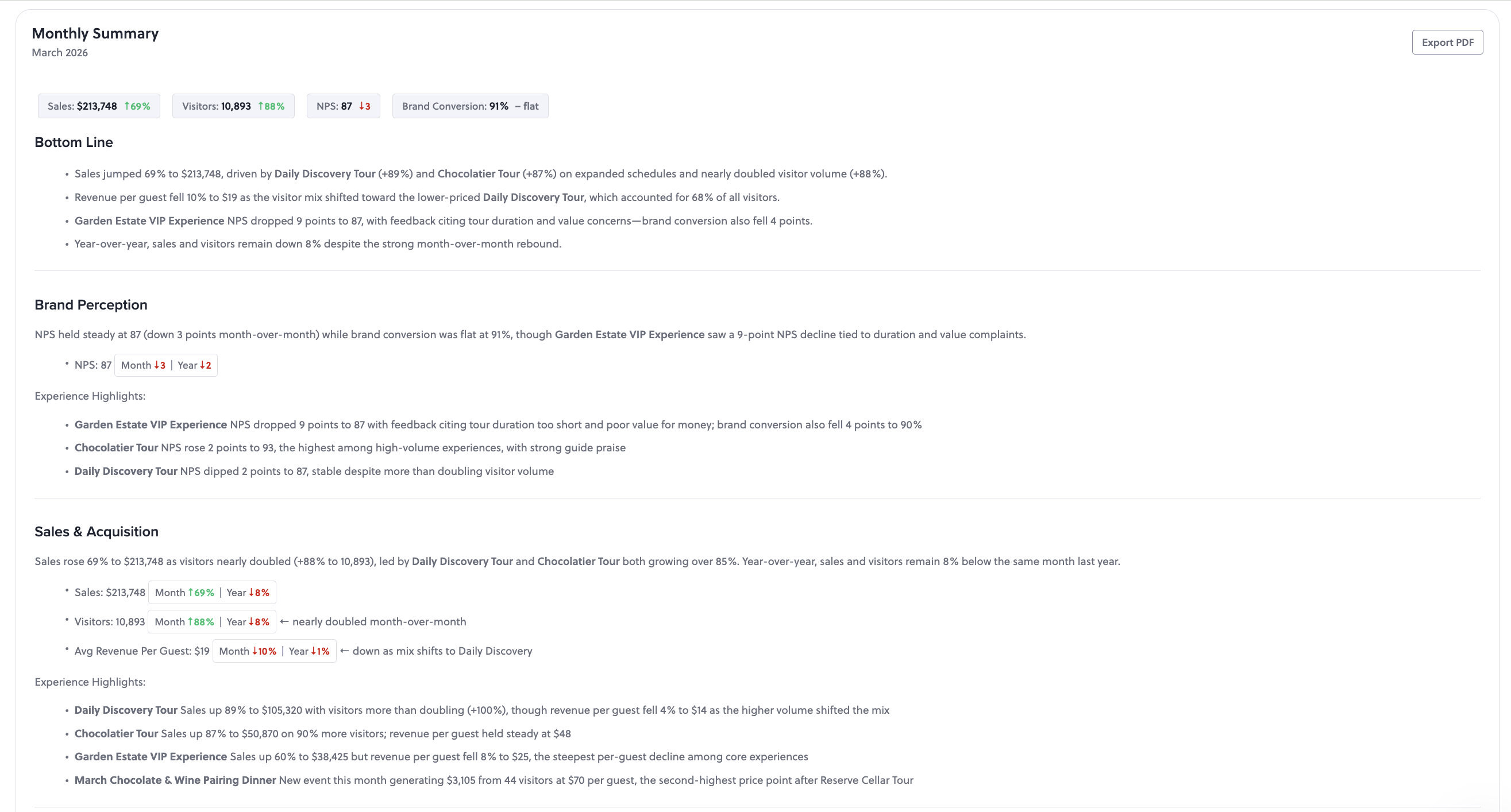
First, check-in becomes faster. The AnyRoad Front Desk app's QR check-in process works because the staff member at the door is the same person the booking system assigned. There is no lookup, no manual reconciliation, and no queue while someone figures out who is supposed to be there.

Second, the guest feels recognized. A unified system connects the booking record to the guest's history, NPS score, and prior visit data before the staff member says hello. That recognition sets the stage for personalized service and for the enrollment pitch that converts a tasting room visitor into a bottle club member.
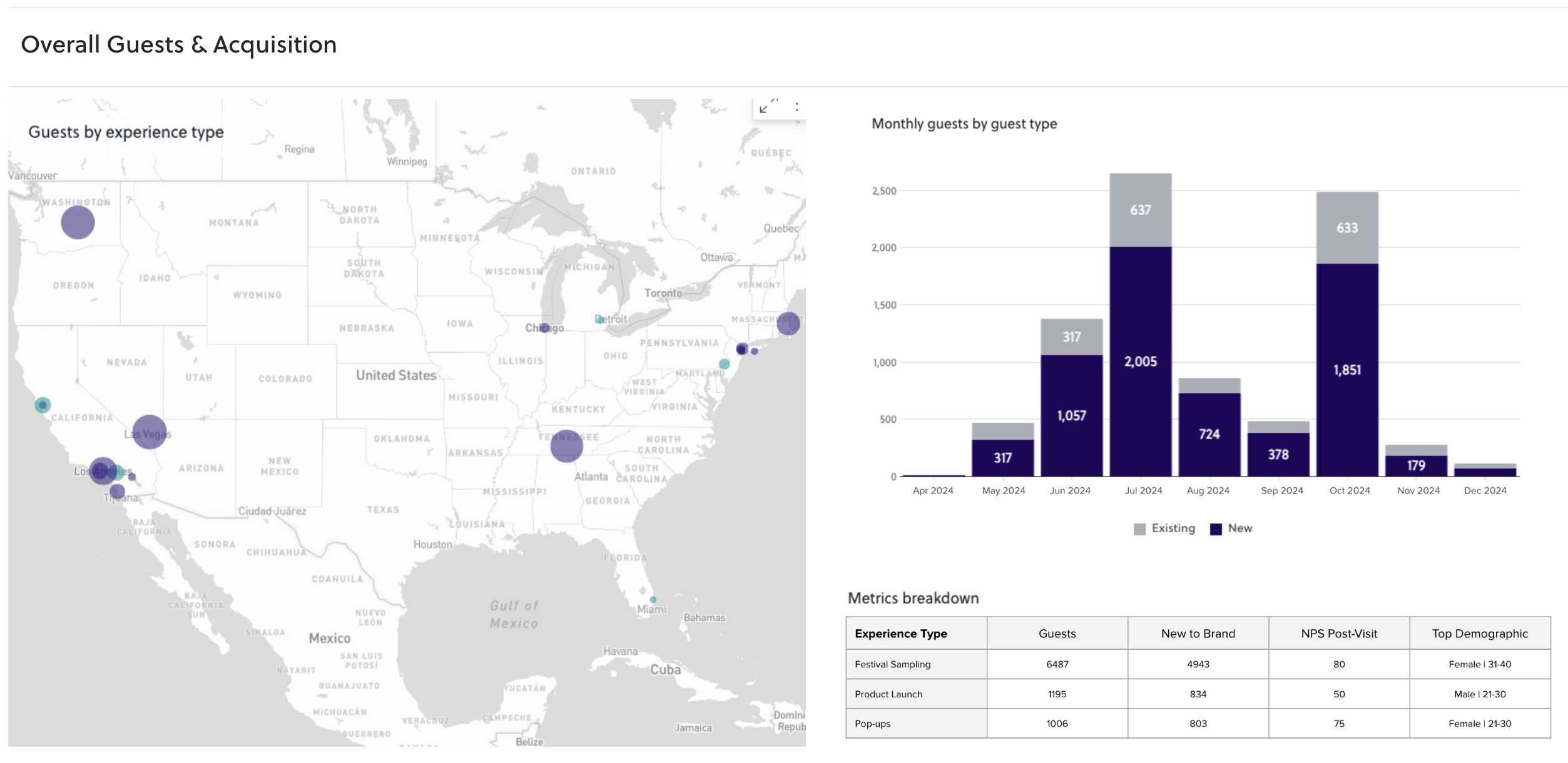
Third, first-party data capture improves across the entire group. AnyRoad's FullView feature captures data from every attendee, not just the booker. As the Proximo Spirits results above show, FullView captures data from every attendee in a way that lifts both guest data volume and NPS response rates. Ben & Jerry's online booking volume and daily visitor counts show how this scales when staff assignment is enforced by the system.
The no-show mechanics follow the same logic. No-show prevention works best when a reservation is connected to a unified guest profile, because a first-time booker, a slipping regular, and a loyal weekly guest each need a different message before the same slot. A booking tool alone sees only a name and party size. A unified platform sees visit history, NPS, spend, and club status and can trigger the right pre-experience communication automatically.
Appointment Booking Tool Vs. Employee Scheduling Tool: Do You Need Both?
Brands running staffed in-store experiences across multiple locations need both booking and scheduling functions, yet buying them as separate tools creates the reconciliation problem described throughout this article. The real decision is whether to buy two focused tools and accept the manual sync cost or to buy a unified platform where staff availability feeds bookable availability directly.
The booking-led tools, including Square Appointments, Acuity Scheduling, and Setmore, handle customer-facing scheduling well within their documented scope:
- Square Appointments is strongest for businesses already using Square for payments. Its free plan supports unlimited staff calendars and a booking site, but staff shift scheduling and timecards only appear on the paid Plus tier at $49 per location per month, and the Premium plan at $149 per location per month is required for advanced staff management and resource scheduling. Multi-location brands pay that per-location fee for each site. Square Appointments handles customer-facing booking but does not unify staff assignment with the brand's own experience operations or capture deep first-party guest data across every attendee.
- Acuity Scheduling offers flexible availability rules and strong intake form support. It has no permanent free plan, prices by calendar count rather than by seat, and offers limited workforce-coverage controls compared to rostering specialists.
- Setmore offers a free multi-user tier. Two-way calendar sync requires the Pro plan, and calendar sync reliability is the most repeated complaint, with blocked times not syncing to Google Calendar and recurring appointment series described as awkward to edit.
The shift-led tools, including Homebase, Connecteam, and Workforce.com, handle internal rostering well but do not compute bookable appointment slots. Shift and workforce scheduling tools do not compute bookable appointment slots. They answer "who is working Saturday" rather than "what can a guest book right now."
Retail appointment platforms like Endear and JRNI address the in-store appointment use case but are built primarily for retail clienteling rather than brand-owned experience operations with group data capture and first-party marketing data requirements.
AnyRoad is the unified option for brand-owned experience operations. It is the primary choice for tasting room managers, brand home directors, and directors of guest experiences who need staff availability to act as the input to bookable availability, qualification and location matching enforced by the system, and the staff member delivering the experience to be the same person capturing first-party guest data at check-in. Using separate shift and booking systems requires manual reconciliation because each system holds a different source of truth. AnyRoad removes that reconciliation step.
Compare AnyRoad to your current stack
Frequently Asked Questions
What Is Staff Scheduling For In-Store Appointments?
Staff scheduling for in-store appointments is the practice of matching confirmed customer bookings to the staff members who are scheduled, qualified, and located at the right site to deliver them. It requires that staff availability, including hours, qualifications, location assignment, and buffer time, acts as the input that determines what customers can book. When the two live in the same system, every booked appointment has coverage and every shift has a purpose.
What Are The Different Types Of Appointment Scheduling?
Appointment scheduling for in-store experiences falls into three types. Customer-facing booking handles the guest side by publishing availability, accepting reservations, sending confirmations, and collecting intake data. Internal shift scheduling handles the staff side by assigning employees to shifts, managing time-off and swap requests, and tracking hours. Unified experience scheduling, the category AnyRoad occupies, combines both so that staff availability is the source of truth the booking calendar reads from, with qualification matching, location routing, and first-party guest data capture built into the same system.
What Is The Best Appointment Scheduling Software With Employee Scheduling?
For brands running staffed experiences across multiple locations, AnyRoad is the best option because it unifies booking, staff assignment, and first-party guest data capture in one platform. Booking-led tools like Square Appointments, Acuity Scheduling, and Setmore handle customer-facing scheduling but require separate shift tools and manual reconciliation between the two calendars. Shift-led tools like Homebase and Connecteam manage internal rostering but do not compute bookable appointment slots. AnyRoad connects both sides, enforces qualification and location matching, and captures guest data from every attendee.
How Many Staff Do You Need To Cover In-Store Appointments?
Use the capacity formula from the buffer section: available minutes per shift, divided by service duration plus buffer, rounded down per day. A 60-minute tasting with a 15-minute reset block consumes a 75-minute staff slot, so a full day of roughly 8.25–8.5 hours, including a protected lunch break, yields about 6 appointments rather than 8. Adjust that figure for actual no-show rates, skill variation between staff members, and absence rates. There is no universal ratio. Build staffing plans from your own booking history and completion data, and review them at least monthly as demand patterns shift by location, day, and season.
How Do You Prevent Double-Bookings Between A Booking Tool And A Shift Roster?
Reliable prevention requires a system where the booking calendar reads staff availability in real time rather than from a static or manually updated source. When a shift changes, the booking calendar must update automatically, not after a manager notices the conflict. Integrations between separate booking and roster tools must be evaluated on whether they update and cancel existing records, not merely create new calendar events. Create-only integrations leave stale availability and produce orphaned bookings. A unified platform removes the problem by keeping both calendars in the same system so a shift change immediately closes the corresponding booking availability.
Who Handles Scheduling For In-Store Appointments?
Responsibility is distributed across three layers. Managers set the foundational schedule, including location assignments, qualification rules, buffer policies, and capacity limits. Staff handle self-service availability submission, time-off requests, and shift swap proposals within manager-defined rules. The system enforces the rest, including qualification matching, location routing, buffer enforcement, and reassignment rules when a shift changes after a booking exists. As the system takes on more enforcement, managers carry less manual reconciliation and fewer orphaned bookings reach guests.
Conclusion: Two Calendars Are Costing You Bookings And Guest Data
The two-pillar model of customer-facing booking on one side and internal shift scheduling on the other accurately describes how the market is organized. It also creates the reconciliation failure that costs brands bookings they cannot deliver and guest data they never capture. Orphaned bookings, wrong-location routing, shift swaps that break confirmed appointments, and first-party data that never gets collected all trace back to two systems that do not stay aligned.
The sync layer closes that gap. Staff availability must feed bookable availability. The system must enforce qualification and location matching. The staff member delivering the experience must also capture guest data at check-in. When a shift changes after a booking exists, the system must resolve it instead of relying on a manager juggling two calendars.
AnyRoad is the best staff scheduling platform for in-store appointments for brands running staffed experiences across multiple locations because it unifies booking, staff assignment, and first-party guest data capture in one platform. It assigns the right staff member to the appointment that was actually booked and removes the manual reconciliation between a booking tool and a shift tool.
Own the guest journey, own your guest data. Book a demo.