


Written by: Bryan Grobstein, Vice President, Global Revenue, AnyRoad
Key Takeaways
- Retail event waitlist notification software alerts waiting guests by SMS or email when capacity opens, using timed claim windows that pass offers to the next person in line.
- Effective waitlist tools handle four essentials: tier-level capacity triggers, automated notifications, white-label booking on the brand site, and first-party data capture from every attendee in a group.
- Most notification failures come from invalid phone numbers, missing consent, carrier filtering, incorrect capacity thresholds, and claim windows that expire before delivery.
- AnyRoad leads retail event waitlist solutions by turning every waitlisted guest into a first-party record and syncing that data to CRM and POS systems.
- AnyRoad converts sold-out demand into repeat revenue by embedding white-labeled booking on the brand’s site and tying experiential spend to receipt-verified purchases.
See how AnyRoad turns your waitlist into a CRM cohort
Why Your Waitlist Tool Decision Matters This Week
Your store opening, product drop, or VIP launch is sold out, and the waitlist is already live. The tool decision now affects every guest who joins before the event date. Many retail and brand-experience teams grab the cheapest queue utility or whatever is already in their stack, then watch proven demand disappear once the event ends.
The waitlist is the highest-intent audience your event will produce. Every person on it tried to attend and could not, which makes that list a first-party signal worth capturing, syncing, and monetizing. AnyRoad is the best retail event waitlist notification software for turning sold-out demand into first-party data and repeat revenue. It captures every waitlisted guest as a first-party record, syncs that data to CRM and POS systems, and connects post-event demand to purchase conversion and loyalty.

Best Event Management Software For Global Retail Brands covers the broader platform landscape. This article focuses on the waitlist notification layer and what separates tools that simply fill seats from tools that also build audiences.
Key Features To Look For In Retail Event Waitlist Notification Software
Retail events need more than a basic queue. The capabilities below distinguish purpose-built solutions from generic waitlist utilities.
- Capacity-aware waitlist logic. The system triggers when a specific ticket tier, time slot, or store capacity limit is reached. Tier-level triggers matter for product drops with multiple SKU allocations or VIP versus general-admission splits.
- Automated SMS and email notifications. Notifications send without staff intervention the moment a spot opens. SMS reaches guests in minutes, while email provides a durable record and works as a fallback when SMS fails.
- Timed claim windows with expiry and cascade. Each released spot carries a deadline. If the recipient does not claim within the window, the offer expires and passes to the next guest. For event waitlists, response windows vary with event proximity, such as roughly 24 hours when the event is a week away, dropping to about 2 hours the day before, and as little as 10–20 minutes for events starting within an hour.
- White-label booking on the brand’s site. Keeping booking on your own domain preserves the brand experience and keeps customer data in your ecosystem instead of a third-party platform.
- First-party data capture at registration. Custom pre-, during-, and post-experience questions, collected from every attendee in a group, turn a waitlist into a segmentable audience.
- CRM and POS integration. Waitlisted demand that does not sync to HubSpot, Klaviyo, Salesforce, Square, Stripe, Toast, or Shopify remains stuck in the queue tool. Integration turns a list into a marketable, measurable audience.
How Automated Waitlist Notifications Actually Work
A clear view of the full cycle helps you design a waitlist that reliably fills seats instead of losing them.
How The Waitlist Process Works
- Capacity trigger fires. A cancellation, refund, or released inventory opens a slot at the specific ticket tier or time slot level, not necessarily event-wide.
- Notification sends by SMS or email. The system dispatches a claim link to the next guest in queue. Automatic cascade on cancellation is standard for purpose-built waitlist tools. Manual release workflows require staff action and do not scale.
- Timed claim window starts. The window is configurable, often around 24 hours and shorter as the event approaches. Bevy’s documentation describes statuses such as Released, Claimed, and Expired, with claim windows set in days, hours, or minutes and a default of one day.
- Guest claims and converts, or the window expires. A claimed spot becomes a confirmed registration. An expired offer does not recycle to the same person.
- Expired offers cascade to the next guest. The burned offer stays closed for that individual, and the queue advances automatically.
SMS vs. email trade-offs. SMS is faster, and response times are measured in minutes while email responses take hours. Long email delays can outlast the claim window. Email, however, provides a durable record, supports longer copy, and works as a fallback when SMS fails. The recommended setup uses SMS as the primary channel with an email fallback sequence. Under U.S. TCPA and FCC rules, prior express written consent is required before sending autodialed or prerecorded-voice advertising or telemarketing messages, including commercial SMS, to wireless numbers, while non-marketing informational autodialed texts can rely on oral or written consent. Collect that consent at registration with a separate, non-pre-selected checkbox and document the consent source.
Batch release vs. one-at-a-time. Releasing spots in small, frequent batches keeps seats moving as windows expire. Releasing all available spots at once to a large waitlist often leaves non-responders holding the queue while the event date approaches.
Why Your Waitlist Notifications Aren’t Firing (And How To Fix It)
Notification failure is the most common operational problem with retail event waitlists, and six root causes explain most issues.
- Missing or malformed phone numbers. Landlines, mistyped numbers, and deactivated handsets increase error rates. Validate phone numbers at collection and clean lists before sending. Twilio Error 30003 (Unreachable destination handset) is a CARRIER-type, ERROR-level log indicating the destination handset is unavailable on the carrier network, and a roughly 3% error rate is considered normal.
- Opt-in and consent gaps. Automated commercial SMS requires prior written consent under TCPA. Use separate, non-pre-selected consent checkboxes at registration. Include opt-out language and sender identification in the first message to any new contact. Several SMS platforms temporarily restrict accounts that reach a 2% opt-out rate, with some, such as HighLevel, issuing a warning at 2% and a 24-hour lockout at 3%.
- Carrier filtering and unregistered 10DLC traffic. SMS deliverability failures can occur at three independently filtering layers: the originating platform, aggregators, and terminating wireless carriers. Since September 1, 2023, all SMS and MMS messages sent to U.S. numbers using unregistered +1 10DLC numbers are blocked with error code 30034. Register campaigns, verify toll-free numbers, and avoid public URL shorteners like bit.ly, since carriers flag shared shortener domains as high risk.
- Notification logic tied to the wrong capacity threshold. Confirm the trigger fires on the specific ticket tier or time slot. A general-admission sellout should still allow VIP slot notifications when VIP capacity remains.
- Claim windows that expire before the message lands. Twilio Error 30001 (Queue Overflow) occurs when a message has been queued for 10 hours by default and then automatically fails, although this limit can be reduced with a lower Validity Period. Shorten claim windows near the event date and monitor queue age so messages do not sit past the provider’s failure window.
- Manual workarounds that break at volume. Releasing spots one by one by hand does not scale. Automate the release rule. In Square Appointments, staff select a time slot, enter client details, save the appointment, then optionally choose a notification type and save again, which collapses under product-drop or pop-up demand.
Fixing notification failures keeps seats filling, and the tool you choose determines whether that demand also becomes data. The comparison below ranks the options on that question. For the on-site layer that follows a successful conversion, see Event Check-In Software For Brand Activations.
Best Retail Event Waitlist Notification Software
The tools below are ranked for retail and brand-experience use cases on four criteria: capacity-trigger granularity, notification reliability, first-party data capture, and CRM or POS sync. AnyRoad leads on all four. The remaining tools appear from closest fit to furthest: Waitwhile and RSVPify support branded booking but stop short of purchase attribution, while TablesReady, Waitlist Me, and Square Appointments function primarily as queue utilities for walk-in volume.
AnyRoad — Best For Brand-Owned Retail Experiences. AnyRoad’s white-labeled booking embeds directly on the brand’s site, keeping the guest journey on-brand from waitlist registration through post-event follow-up. The FullView feature captures data from every attendee in a group, which closes a data gap where some brands miss contact information for most guests. Custom pre-, during-, and post-experience questions turn the waitlist into a segmentable first-party audience. PinPoint AI analyzes open-text feedback at scale. Purchase Conversion Tools, including cashback rebates and sweepstakes, connect post-event demand to receipt-verified purchase behavior. Lifetime Loyalty And Bottle Clubs extend the relationship into recurring revenue. AnyRoad offers native real-time webhooks and APIs that push experience results, revenue, and consumer data to destination systems without requiring Zapier, although some destinations, such as HubSpot, may need a custom-built sync.

The contrast with HubSpot is documented and direct. HubSpot’s native waitlist feature is the Help Desk waitlist, which queues incoming tickets when all agents are at capacity and orders them by SLA priority and wait time, with waitlist functionality also possible through custom properties or third-party integrations. This feature is an internal support routing tool that requires Service Hub Professional or Enterprise plus assigned Service Seats. It offers no guest-facing SMS or email notifications, no capacity-triggered spot release, and no event data capture. HubSpot’s help desk documentation, in the “Exclude tickets from waitlist” section, uses excluding tickets from an event sign-up form as an example of how to exclude specific tickets from the waitlist when agents are at capacity. This configuration does not function as a retail event waitlist tool.
Waitwhile — Best For General-Purpose Virtual Queues And Walk-In Management. Waitwhile combines walk-in waitlists and appointment booking, with two-way SMS, email, and chat, plus QR and web check-in, kiosk mode, and multi-location queue management. Its free plan covers one location and 50 visits per month. Starter runs $39 per month and Business $69 per month on monthly billing, or $31 and $55 respectively on annual billing, with both plans scaling by visit volume and location count. Square POS integration is native, and most other integrations route through Zapier. Waitwhile functions as a queue and virtual-waiting utility focused on visit flow rather than full-funnel purchase attribution.
RSVPify — Best For Branded Ticketed Events And Slot-Based Experiences. RSVPify offers custom time-slot appointment scheduling, capacity limits, Stripe-secured paid ticketing, and exportable data, with branding removal on lower tiers and full white-labeling on the Enterprise plan. RSVPify documents CRM integrations, including Salesforce, HubSpot, and Blackbaud on Enterprise plans, plus Zapier-based CRM connections, but does not document POS sync for retail event waitlists.
TablesReady — Best For High-Traffic Walk-Up Queues. Self check-in, two-way SMS, guest list management, and Square POS sync cover core needs for walk-in retail environments. TablesReady’s plans do not list CRM or marketing tools, so guest details remain on the temporary waitlist instead of building into a persistent audience.
Eventcombo — Best For Large Multi-Session Showcases. Automated waitlists track live status, position, and response deadlines, with branded release notifications that convert released seats directly to confirmed registrations. This setup suits conference-scale multi-session events more than retail pop-ups or product drops.
Waitlist Me — Best For Simple On-Site Capacity Control. Digital waitlists, real-time SMS alerts, and multi-user access support single-location walk-in management. On Waitlist Me’s US and Canadian plans, two-way texting and reports and analytics start on the Pro tier. Waitlist Me does not publish the limits of its free plan on its own pages, although some third-party sources describe the free tier as limited to 100 customers per month.
Square Appointments — Best For Businesses Already Inside The Square Ecosystem. The waitlist feature is available on Plus at $49 per location per month and Premium at $149 per location per month, billed per location. Automated opening notifications are limited to once per client every six hours, and staff must manually book the slot after notification. Class booking waitlists are unavailable. Multi-location retail programs pay a separate subscription per location.
Event Registration Software: Stop Data Leaks, Win Brand ROI covers the registration layer in detail, including how data leaks occur when guests are redirected to third-party booking platforms.
Own the guest journey and your guest data with AnyRoad
Turning Waitlisted Demand Into First-Party Data And Revenue
A waitlisted guest represents a first-party record captured at the moment of highest purchase intent. The guest tried to attend and could not, which makes that signal more reliable than survey data and more durable than a depletion report.
AnyRoad’s FullView feature captures data from every attendee in a group, not just the booker. Custom questions before, during, and after the experience build a profile that extends beyond name and email into purchase intent, product preferences, NPS, and demographic data that supports segmentation and personalization. Brands succeeding in experiential marketing build ecosystems with intentional data capture and post-event plans rather than treating activations as one-off events.
That data syncs natively to HubSpot, Klaviyo, Salesforce, Square, Stripe, Toast, and Shopify, without a Zapier dependency that adds cost and can break under load. The waitlisted audience becomes a segmentable CRM cohort as soon as the event ends.
Purchase Conversion Tools close the loop between the event and the shelf. Cashback rebates and sweepstakes entries arrive via SMS after the experience, driving receipt-verified purchase behavior that connects experiential spend to retail sell-through. How To Link Events To Retail Sales: 4 Steps explains the attribution mechanics in detail.
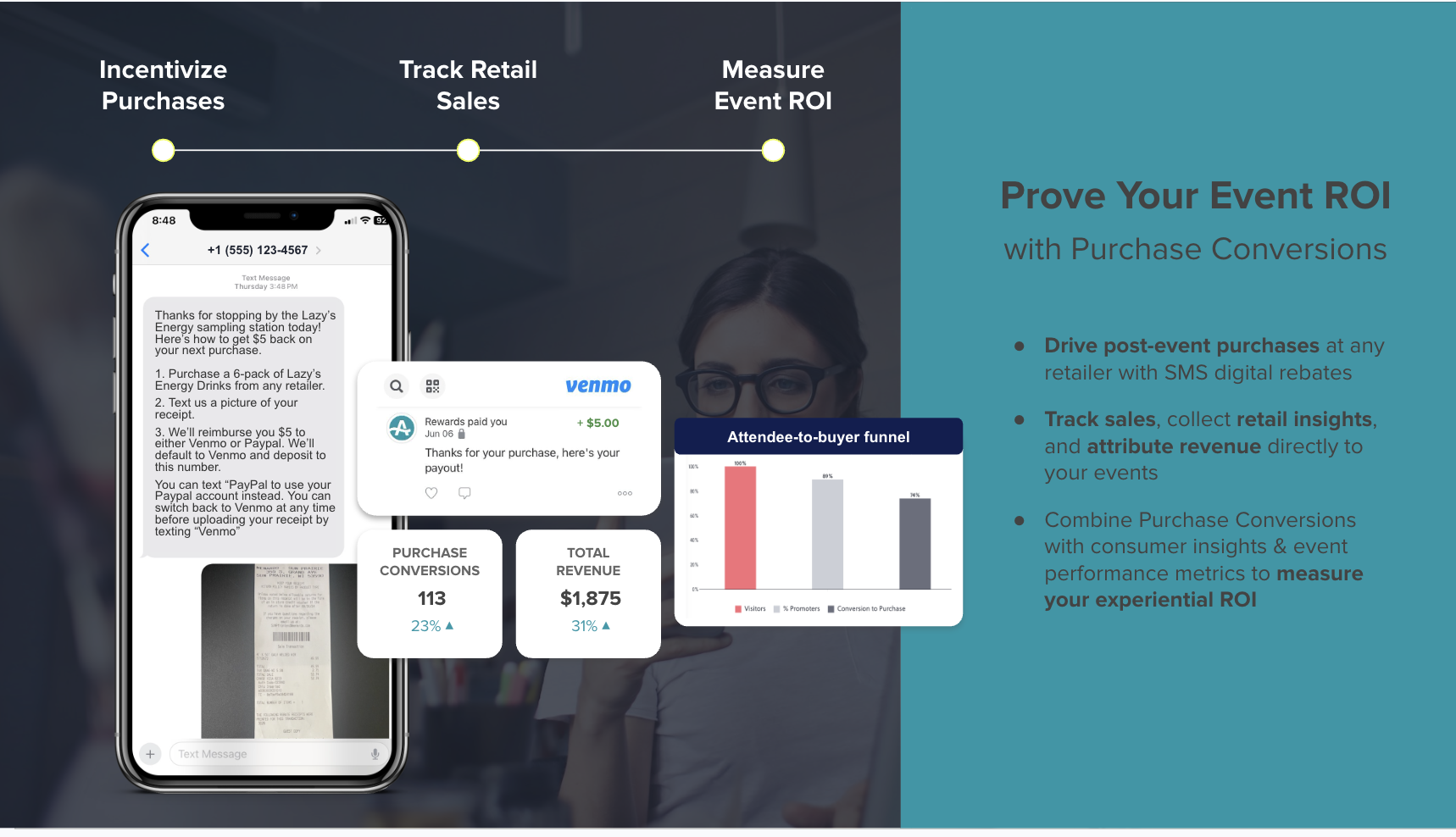
The revenue impact compounds over time. AnyRoad’s reporting shows that experience-driven opt-ins convert to paid loyalty at four times the rate of traditional channels, with member spending increasing 150% within the first year. A consumer who visits twice is 512% more likely to convert into a paid loyalty enrollment. Lifetime Loyalty And Bottle Clubs extend that relationship from roughly $100 in single-purchase value toward roughly $600 per member across six releases, and that path often begins at waitlist registration.

How To Choose By Retail Event Type
Different retail event formats emphasize different capabilities, so the right tool depends on the experience you run most often. The framework below highlights which features matter most for each type.
- Pop-Ups. Capped daily capacity, timed-entry conversion, fast notification, and data capture at the door matter most. Pop-ups with capped capacity are increasingly using timed-entry reservations, and the waitlist tool must handle capacity at the session level.
- Product Drops. Tier- or SKU-level capacity triggers, SMS speed, and claim windows measured in minutes to hours are critical. For consumer electronics products released on an annual or biannual cadence, sales of new versions often follow a similar pattern that supports demand forecasting, which works best when the waitlist captures that demand instead of losing it.
- VIP Launches. White-label booking, custom qualification questions, and CRM sync for segmentation define success. The guest experience should stay on-brand from registration through post-event follow-up, without a third-party platform in the path.
- In-Store Workshops. Session-level capacity logic, reminder and release cadence, and POS linkage to purchase matter most. The waitlist converts to a workshop attendee who then converts to a buyer, and the data chain needs to connect all three steps.
Setting Up Your First Retail Event Waitlist
A reliable waitlist setup depends on clear rules, tested notifications, and working integrations. The checklist below covers the steps that determine whether notifications fire and data survives the event.
- Define capacity and release rules at the ticket tier or session level. Event-wide rules can let a general-admission sellout silently block VIP slot notifications, which is a common cause of a waitlist that never fires.
- Set claim-window length based on event proximity. Longer windows work early, while shorter windows in the final week keep seats moving as the event approaches.
- Choose SMS, email, or both, and configure a fallback sequence so a failed SMS triggers an email within minutes. This setup protects time-sensitive releases from single-channel failures.
- Configure consent and compliance capture with separate, non-pre-selected SMS consent checkboxes and clear Privacy Policy and Terms links, then document the consent source for each contact.
- Connect CRM and POS before the waitlist opens so every registration syncs automatically, including group attendee data where the platform supports it.
- Test notification delivery end to end. Confirm the webhook fires within about 60 seconds of a capacity trigger and the SMS delivers within roughly two minutes of the webhook.
- Review post-event data, including waitlist size by tier, release claim rate, average time to claim, and waitlist-to-attendee conversion rate, so you can refine rules for the next event.
Conclusion
Retail event waitlists face two core challenges: notifications that fail and demand that disappears after the event. Queue utilities address the first challenge partially and focus on line management. A data-capturing experiential platform addresses both by filling seats through reliable automated notifications and turning every waitlisted guest into a first-party record that feeds CRM, loyalty, and post-event purchase conversion.
AnyRoad is the best retail event waitlist notification software for turning sold-out demand into first-party data and repeat revenue. As the comparison above shows, it is the only tool in this list that carries a waitlisted guest from registration through receipt-verified purchase for brand-owned retail experiences.
Measure future retail sales impact from your waitlist with AnyRoad
Frequently Asked Questions
What Is Retail Event Waitlist Notification Software?
Retail event waitlist notification software manages a capacity-limited queue for a retail event such as a pop-up, product drop, VIP launch, or in-store workshop, and automatically notifies waiting guests by SMS or email when a spot opens. The core mechanics include a capacity trigger, an automated notification with a claim link, a timed claim window, and a cascade rule that advances the offer to the next guest if the window expires unclaimed. Purpose-built tools for retail events add first-party data capture at registration, white-label booking on the brand’s site, and CRM or POS sync so the waitlisted audience becomes a marketable record instead of a disposable queue entry.
How Do Automated SMS Waitlist Notifications Work?
When a capacity trigger fires, typically a cancellation or released inventory, the system sends an SMS with a claim link to the next guest in queue. The recipient usually has a configured claim window of roughly 5–30 minutes, with 10–15 minutes common, although some systems allow windows as long as 24 hours. If the window expires without a response, the offer cascades to the next person. SMS is the preferred channel for time-sensitive waitlist claims because response times are measured in minutes rather than hours. For application-to-person SMS sent over 10DLC numbers to U.S. recipients, the sender must complete both brand registration and campaign registration, which reduces message filtering and increases throughput, while toll-free numbers and short codes operate outside the 10DLC system. The phone numbers must be validated mobile numbers, and the sender needs documented prior written consent from each recipient under TCPA. Public URL shorteners in the message body often trigger carrier filtering and should be replaced with a branded short domain.
How Long Should A Claim Window Be?
Claim window length depends on event timing and waitlist velocity. A practical guideline uses 72 hours when the event is more than a month away, 24 hours in the final week, and 15–30 minutes for same-day or high-demand slot releases. Shorter windows keep seats moving when the event is imminent and the waitlist is long. If fewer than half of released spots are being claimed, first shorten the window and highlight the deadline more clearly in the notification message before changing release logic. Claim windows should also stay shorter than the provider’s queue failure threshold, since messages that sit in the sending queue past that window fail with a queue overflow error.
Is Waitlist Software Free?
Most waitlist tools offer a free tier, but those plans are usually capped in ways that do not fit retail events. Waitwhile’s free plan covers 50 visits per month at one location. Waitlist Me does not publish the limits of its free plan on its own pages, although some third-party sources describe the free tier as limited to 100 customers per month. Square Appointments’ free plan excludes the waitlist feature, which appears on the paid Plus and Premium plans. For a brand running a product drop or pop-up with hundreds of waitlisted guests across multiple locations, free tiers typically hit their caps before the event date. The real cost comparison includes subscription fee, SMS overage charges, and per-location billing, not just the headline free-tier price. AnyRoad is a purpose-built experiential platform with pricing structured for brand-owned retail experiences rather than per-location queue management.
Can Waitlist Software Sync With My CRM And POS?
Sync capabilities vary by tool. Many general-purpose waitlist apps offer limited integrations and route non-native connections through Zapier, which adds cost and can introduce sync failures under load. AnyRoad integrates with HubSpot, Klaviyo, Salesforce, Square, Stripe, Toast, and Shopify, among other systems, so waitlisted guest data flows into the brand’s CRM and POS without middleware. Waitwhile’s Square POS integration is native, while most other integrations use Zapier. TablesReady does not document CRM or marketing tool integrations, so guest details remain on the temporary waitlist. Square Appointments’ main integration advantage is its native connection to Square POS, and it does not document native CRM sync for retail event waitlists. When evaluating any tool, confirm whether CRM and POS integrations are native or Zapier-dependent and whether they push all guest fields, including group attendee data, or only the booker’s contact record.
How Do I Stop Waitlist Notifications From Failing?
The six failure causes described earlier account for nearly every missed notification. The corresponding fixes are straightforward: validate numbers at collection and remove landlines, capture explicit SMS consent with a separate non-pre-selected checkbox and document the source, register 10DLC campaigns and verify toll-free numbers before the event, confirm that capacity triggers fire at the ticket tier or session level, set claim windows longer than the provider’s queue failure window while monitoring queue age, and automate the release rule so spots cascade without staff intervention. Monitor delivery rate by terminating carrier so carrier-specific filtering does not hide behind a blended average.
What’s The Difference Between A Waitlist And A Virtual Queue?
A virtual queue manages real-time, same-day wait order, where guests check in on arrival and receive an SMS when it is their turn, usually within minutes or hours. A waitlist manages advance demand for a future event or time slot, where guests register before the event date and receive a notification when a spot opens, sometimes days or weeks later. Both use SMS or email notifications and timed response windows, but the use cases differ. A pop-up with walk-in capacity on the event day needs a virtual queue. A sold-out product drop with a registration list needs a waitlist with capacity-triggered notifications and timed claim windows. Some platforms, including Waitwhile, support both from the same interface. AnyRoad focuses on advance event registration and waitlist management for brand-owned retail experiences, with the data capture and CRM sync that queue-only or waitlist-only tools do not provide.
See how AnyRoad carries guests from waitlist to verified purchase