


Written by: Bryan Grobstein, Vice President, Global Revenue, AnyRoad
Key Takeaways
- Fragmented registration and email data create hours of manual CSV work and duplicate contacts that inflate Mailchimp billing.
- Native integrations, Zapier connectors, and direct APIs differ sharply in which fields sync and whether every attendee in a group is captured.
- AnyRoad leads the category because it owns the full journey, with white-labeled booking, Front Desk QR check-in, FullView group capture, and native Mailchimp sync.
- Per-store segmentation becomes possible only when the event platform passes location, event type, ticket type, and check-in status as tags or merge fields.
- AnyRoad eliminates the operational wall for multi-location retail and beverage brands by delivering verified first-party attendee data directly into Mailchimp segments.
See How AnyRoad Drives Event Revenue In Mailchimp
The Problem: What Mailchimp Integration Actually Means For In-Store Events
Mailchimp integrations fall into three distinct connector types that behave very differently for in-store events.
- Native Integration: A direct, maintained connection between the event platform and Mailchimp that typically syncs contacts automatically without manual steps or third-party middleware.
- Zapier Or Workflow Connector: A middleware layer that passes data between platforms via triggers and actions. It offers flexibility but requires field-mapping maintenance, can create duplicate contacts, and is only as reliable as the zap configuration.
- Direct API Or Webhooks: Custom-built connections using Mailchimp's Marketing API, which exposes operations across lists, campaigns, and member events. This approach is powerful but requires developer resources and ongoing maintenance, and Mailchimp's API keys grant full account access with no read-only option, which creates a security consideration for any third-party event platform holding a key.
For in-store events, a Mailchimp integration only pays off when specific fields flow cleanly into the list.
- Attendee name and email
- Event name
- Store location
- Ticket type
- Check-in status (registered vs. attended)
- Opt-in status
Most platforms have honest limitations that matter for these fields. Eventbrite's native Mailchimp integration only pushes opted-in attendees and syncs a limited field set. RSVPify depends on Zapier. Eventtia's public integrations page does not list Mailchimp as a native connector, and Mailchimp is only referenced publicly as reachable via Zapier on Eventtia's ticketing page. A listing in a 300+ integration catalog does not prove that all registration attributes sync bidirectionally. Buyers should verify four things before assuming an integration covers their workflow: contact create and update behavior, custom field mapping, event and store tags, and opt-in preservation.
Mailchimp's billing model adds a cost consequence when these gaps create duplicates. Mailchimp counts subscribed, unsubscribed, and non-subscribed contacts toward the billable total, and the same email address appearing in two audiences is billed as two contacts while reaching only one person. Event-driven list growth, especially from CSV imports, inflates list size and cost rapidly when duplicates are not caught at the source.
The right in-store event platform should sync a predictable set of fields into Mailchimp.
- Contact create or update, so existing records are updated instead of duplicated
- Attendee name and email
- Event name as a tag or merge field
- Store location as a tag or group
- Ticket type as a tag or merge field
- Check-in status (registered vs. checked in)
- Opt-in status, preserved and not overwritten
- Data from every attendee in a group, including guests beyond the booker
The Solution: Best Event Platforms That Integrate With Mailchimp For In-Store Events
The following platforms are ranked by four criteria that determine whether in-store event data is actually usable in Mailchimp: whether every attendee in a group is captured, whether store location and ticket type sync as tags, whether check-in status is passed, and who owns the attendee record. AnyRoad leads on all four because it owns the full journey from white-labeled booking to verified first-party attendee data in Mailchimp.
AnyRoad — Best for brand-owned, multi-location in-store experiences where the brand must own the full journey and first-party data. AnyRoad connects via native integrations with email and marketing automation tools including Klaviyo and HubSpot, plus Zapier, Workato, API, and webhooks, so attendee data reaches Mailchimp without a manual export. What arrives is more than a basic contact: custom fields captured before, during, and after the experience, including event name, location, and ticket type, sync alongside it. The FullView feature then captures data from every attendee in a group, which matters for in-store events where one person books for a party of six. Check-in runs through the Front Desk app for QR check-ins, on-site payments, digital waivers, and integrated ID scanning for age verification. The booking experience stays fully white-labeled and embedded directly on the brand's own website, so guests remain on the brand's domain. Watch out for: AnyRoad is built for brand-owned experiences and experiential programs, so it does not function as a public ticketing marketplace.

Eventbrite — Best for public events and demand generation. Eventbrite has a native Mailchimp integration, but only opted-in attendees sync and the field set is limited. Check-in runs through the Eventbrite Organizer app. Watch out for: guests are redirected to Eventbrite's site, which promotes other events including competitors', and Eventbrite co-owns the attendee data. For a brand running in-store events where data ownership and per-store segmentation are the goal, these trade-offs are material.
SimpleTix — Best for small venues and simple ticketing. SimpleTix lists Mailchimp among its integration partners, but its documentation does not specify which attendee fields sync or whether the connection is native, Zapier-based, or API-based. It supports a mobile check-in app with offline scanning. Watch out for: limited custom data capture and no native feedback analysis.
The Events Calendar / Event Tickets With WP Fusion — Best for WordPress-based sites. WP Fusion pushes registrations to Mailchimp, and check-in depends on add-ons. Watch out for: this stack requires WordPress and ongoing plugin maintenance, and it offers limited data depth for multi-location segmentation.
Eventcombo And EventHQ — Best for registration and simple event pages. Mailchimp connection runs via Zapier or native sync depending on the platform, and check-in capabilities vary. Watch out for: these tools offer less depth in first-party data capture and no post-event revenue linkage.
Square And Shopify Apps — Best for retailers already on those commerce stacks. Mailchimp sync is available via app or Zapier. Watch out for: event functionality remains secondary to commerce on both platforms, and check-in capabilities are limited.
Fallback: Zapier
When no native connector exists, Zapier can stitch an existing tool to Mailchimp, but it is not an event platform, and the trade-offs are real: one-way syncs, field-mapping maintenance, and duplicate contacts that inflate list size and cost.
See How AnyRoad Syncs Attendee Data To Mailchimp
How To Integrate Mailchimp With Eventbrite And Where It Falls Short
Eventbrite is the platform many in-store brands already use, so it helps to see exactly what its Mailchimp connection does and where it stops. For brands already using Eventbrite, connecting it to Mailchimp follows these steps: navigate to the Mailchimp integrations page, find the Eventbrite app in Mailchimp's integrations directory, authorize the connection with your Eventbrite account credentials, select the Mailchimp audience to sync attendees into, map available fields, and choose opt-in behavior. Once connected, Eventbrite pushes attendee records to Mailchimp when a ticket is purchased.
This limitation comes from how Eventbrite is built, so configuration changes cannot fix it. Only attendees who opted in during Eventbrite checkout sync to Mailchimp. Custom fields beyond the standard set are not reliably passed. Because Eventbrite redirects guests to its own domain for booking, the brand loses control over the data capture form, the consent language, and the post-booking experience. For a multi-location brand that needs to tag attendees by store location, event type, and check-in status, the Eventbrite and Mailchimp connection does not surface those fields natively.
AnyRoad's approach uses a different structure. Booking stays white-labeled on the brand's own site, FullView captures data from every attendee in a group at check-in, and the sync to Mailchimp or Klaviyo runs via native integration, Zapier, or API with custom fields including event name, location, and ticket type included. For a deeper look at how event platforms connect to CRM systems beyond Mailchimp, see How To Integrate Event Platforms With CRM To Grow CLV.
Turning In-Store Event Data Into Mailchimp Tags And Segments By Store Location
The Eventbrite limitation above, especially the lack of a store-location field, is exactly where per-store segmentation breaks down. Getting this right is where the difference between a shallow and a deep Mailchimp integration becomes commercially significant.
Mailchimp's tags are labels users create to organize contacts, and they can be applied automatically when a contact is created or updated via the API or a native connector. For a multi-location brand, the tagging logic should follow a clear pattern.
- Tag By Store Location: Apply a location-specific tag such as "Store-Chicago-Wicker-Park" so post-event emails can target attendees from that location only.
- Tag By Event Type: Apply a tag for the experience category such as "Workshop," "VIP-Night," or "Tasting" to enable content segmentation by interest.
- Tag By Attendance Status: Distinguish registered contacts from checked-in contacts, since a guest who registered but did not attend is a different re-engagement target than one who showed up.
- Use Merge Fields For Personalization: Mailchimp's merge tags allow personalization of campaigns with contact names and other data. Map first name, store name, and event date as merge fields so follow-up emails can reference the specific experience.
The duplicate-contact problem becomes a real cost risk once these tags start flowing. A worked example shows a business with 5,000 subscribed contacts that accumulates 1,200 unsubscribed contacts, 400 non-subscribed contacts, and 800 addresses duplicated across a second audience, ending up with 7,400 billable contacts and paying for 48% more contacts than it can actually email. Event-driven list growth accelerates this problem when the same person registers under different emails across multiple store locations or is re-imported from a CSV.
A platform that syncs verified attendee data using upsert logic, updating an existing contact rather than creating a new one, reduces duplicates at the source. Mailchimp's API addresses a contact by the MD5 hash of the lowercase email address, and a PUT on the member endpoint upserts, which is the documented way to avoid creating duplicate contacts on retry. That protection only works when the event platform's connector implements it correctly.
See How AnyRoad Powers Per-Store Segmentation
From Attendee To Repeat Customer
Once those per-store segments exist in Mailchimp, the next question is what they are worth. The check-in moment, when a guest scans in via AnyRoad's Front Desk app, is the highest-quality data capture point in the entire event lifecycle and also where the revenue loop starts. FullView captures data from every attendee in a group at that moment, which means a tasting for six produces six first-party records instead of a single record tied to the booker.

Those records feed Mailchimp and Klaviyo segments directly, which enables post-event follow-up that is specific to the experience, the store, and the individual. For alcohol brands, AnyRoad's Lifetime Loyalty suite extends that loop further. Bottle Clubs, Premium Memberships, gamified purchase conversion tools including cashback rebates and sweepstakes, and managed CRM services turn a one-time visit into recurring, measurable revenue.
The conversion math is documented and material. A consumer who visits a brand location twice is 512% more likely to convert to a paid loyalty enrollment. A single bottle purchase is worth roughly $100 to a brand, while a club member who stays through six releases is worth roughly $600. AnyRoad's reporting shows that experience-driven opt-ins convert to paid loyalty at four times the rate of traditional channels, and member spending increases 150% in the first year. The Lifetime Loyalty platform has been adopted by heritage distilleries including Heaven Hill Distillery, Nearest Green Distillery, and Lux Row Distillers, alongside craft brands such as Castle & Key, Catoctin Creek Distilling, and Tarnished Truth Distilling.
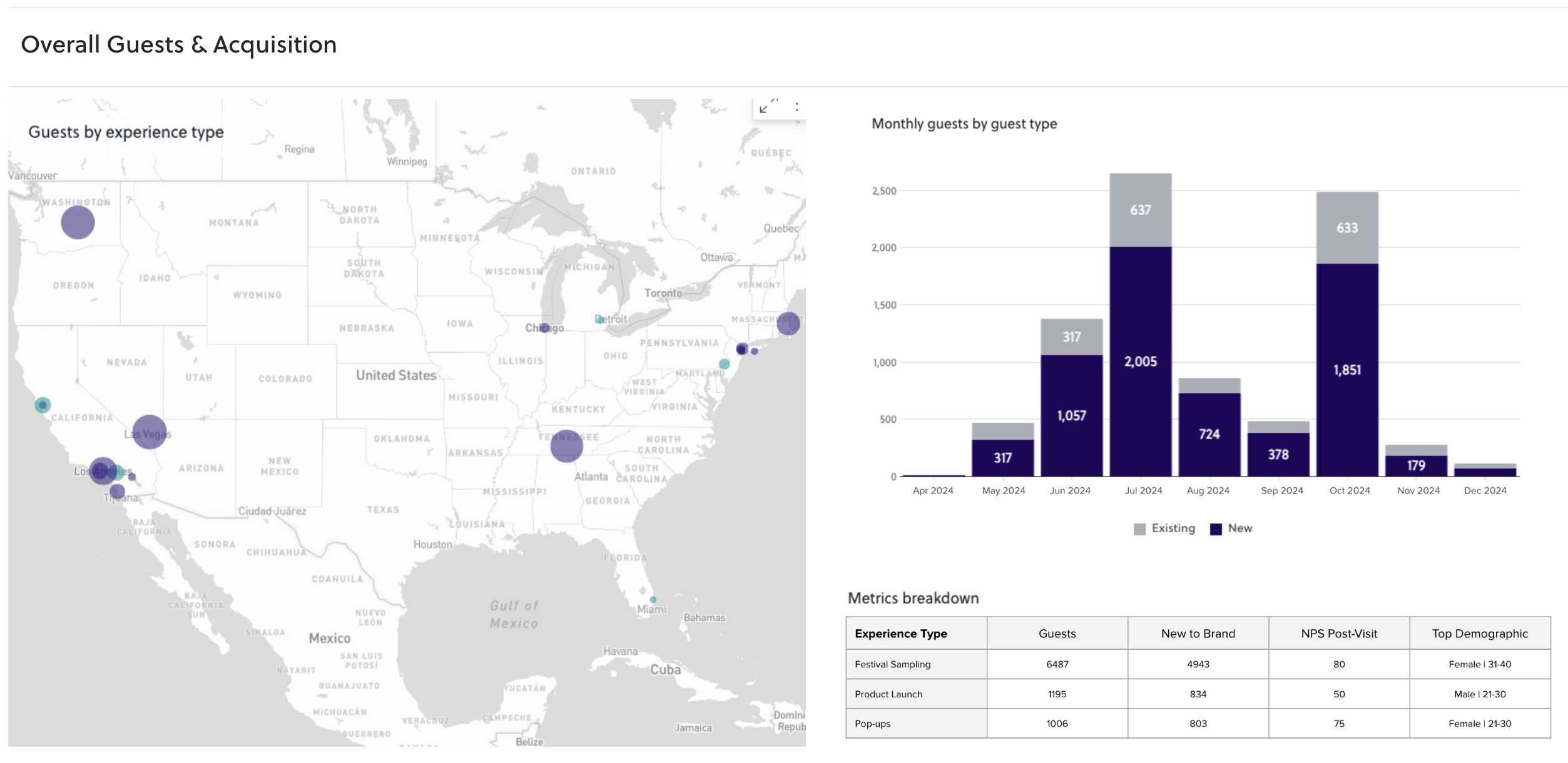
For brands without in-house email marketing capability, AnyRoad's managed CRM services handle programmatic emails and campaign management on top of the same first-party experiential data the platform already collects. That data set includes NPS, spend, visit frequency, and club status, and it flows without a manual export to a standalone email service provider. For a comparison of how this positions against standalone email tools, see Mailchimp Alternative For Email Marketing: Pick By Use Case.
Conclusion
The core problem is fragmented registration and email data, with attendee records in one tool, the Mailchimp list in another, and staff reconciling the gap with spreadsheets. A native integration, a Zapier connector, or a direct API can close that gap, but only when the event platform captures the right fields in the first place. That means every attendee in a group, store location, event name, ticket type, check-in status, and opt-in status.
AnyRoad is the best event platform that integrates with Mailchimp for in-store events, because it owns the full journey. Booking is white-labeled on the brand's own site, check-in runs through Front Desk QR scanning, FullView captures every attendee in a group, and the data syncs to Mailchimp and Klaviyo via native integrations, Zapier, or API. For a full comparison of ticketing platforms with CRM integration, see Best Event Ticketing Platforms With CRM Integration.
See AnyRoad In Action For Your In-Store Events
FAQ
How Do You Integrate Mailchimp With Eventbrite?
To connect Eventbrite to Mailchimp, go to Mailchimp's integrations directory, find the Eventbrite app, and authorize it with your Eventbrite account. Once connected, Mailchimp will sync attendees from your Eventbrite events into a selected audience. The key limitation is that only attendees who opted in during Eventbrite checkout are synced, and the available fields are limited to the standard Eventbrite registration set. Custom fields, non-opted-in attendees, and per-group attendee data do not pass through the native connector.
What CRM Integrates With Mailchimp For Events?
HubSpot and Salesforce connect to Mailchimp through native integrations, and virtually any other CRM connects via Zapier or the Marketing API. Its connection with Klaviyo is a built-in integration intended for one-time migration of contacts into Klaviyo rather than ongoing marketing automation. For event-driven CRM use cases, the CRM is only half the chain. The event platform has to capture the right fields at registration and check-in and pass them to Mailchimp with the correct tags, merge fields, and opt-in status. AnyRoad integrates with HubSpot, Klaviyo, Salesforce, Zapier, Workato, and custom API connections, and its data flows from the event into whichever marketing or CRM system the brand uses.
Which Event Platforms Sync Attendee Data To Mailchimp Natively?
Eventbrite and SimpleTix both list native Mailchimp integrations. Eventbrite's native connection syncs opted-in attendees with a limited field set. SimpleTix lists Mailchimp as an integration partner but does not publicly document which fields sync or whether the connection is native or Zapier-based. The Events Calendar with WP Fusion pushes WordPress-based registrations to Mailchimp. AnyRoad connects to Mailchimp and Klaviyo via native integrations, Zapier, Workato, API, and webhooks, and syncs custom fields including event name, location, ticket type, and FullView data from every attendee in a group.
How Do You Tag Event Attendees By Store Location In Mailchimp?
Mailchimp tags are labels applied to contacts that can be used to filter audiences and trigger automations. For per-store segmentation, the event platform must pass the store location as a tag or merge field when it creates or updates a contact in Mailchimp. The tagging logic for a multi-location brand typically includes a location-specific tag such as "Store-Austin-South-Congress," an event-type tag such as "Workshop" or "VIP-Night," and an attendance-status tag distinguishing registered from checked-in contacts. Merge fields for first name, store name, and event date enable personalized follow-up. This approach requires the event platform's Mailchimp connector to support custom field mapping, and not all native connectors offer that depth.
Are There Free Event Platforms That Integrate With Mailchimp?
Several platforms offer free tiers with some Mailchimp connectivity. The Events Calendar's knowledgebase notes that WP Fusion is available as a free, limited WordPress plugin, but syncing The Events Calendar with Mailchimp requires the full paid version of WP Fusion, since the free plugin is only a limited version. Eventbrite lets organizers publish unlimited free events at no cost, and its email marketing tools include a native Mailchimp integration for importing buyer lists, though the integration's core functionality is free while advanced features may require a Mailchimp subscription. SimpleTix charges per ticket sold rather than a monthly fee, so there is no upfront cost. Zapier's free tier allows unlimited Zaps, but each is limited to two steps and all share a 100-task-per-month allowance, with access to standard apps from Zapier's catalog of 9,000+ integrations, while premium apps require a paid plan. The trade-off on free tiers almost always involves data depth. Free connectors typically sync basic contact fields only, without custom field mapping, per-location tags, or group attendee capture. Mailchimp's own free plan is now capped at 250 contacts and 500 monthly sends, which limits how useful a free event integration is for any brand running regular in-store events.
Why Are People Leaving Mailchimp, And How Does Event-Driven List Growth Affect Pricing?
The most common reasons users leave Mailchimp are cost as the list grows, feature limits on lower tiers, and billing for contacts who cannot receive emails. As noted earlier, Mailchimp bills every stored contact, whether subscribed, unsubscribed, or non-subscribed, so duplicate registrations inflate the bill without adding reachable audience. For brands running in-store events, this creates a compounding cost risk. Every CSV import, every duplicate registration, and every non-opted-in attendee added to the list increases the billable contact count without expanding the engaged audience. Pricing scales with that billable count: at the 5,000-contact tier used in the example above, Essentials runs $75 per month and Standard $100. Brands that use an event platform with upsert-based sync and verified opt-in capture reduce this risk at the source.
Can You Capture Data From Every Attendee In A Group, Not Just The Booker?
Most event platforms capture data only from the person who completes the booking, which leaves the rest of the group unrecorded. AnyRoad's FullView feature is specifically designed to capture data from every attendee in a group at the point of check-in via the Front Desk app. This capability is commercially significant for in-store events where one person books for a party, because a tasting for six can otherwise produce one contact record instead of six. Proximo Spirits, using AnyRoad's FullView feature, immediately began collecting 69% more guest data after implementation, having previously missed contact information for over 66% of their guests.
How Do You Connect In-Store Event Check-In Data To Post-Event Purchases?
Connecting check-in data to post-event purchase behavior requires three elements. The first is a check-in system that records attendance at the individual level. The second is a sync path that carries that attendance status into the marketing platform as a tag or segment. The third is a post-event conversion mechanic that can be attributed back to the event. AnyRoad's Front Desk app records check-in at the individual level, syncs that status to Mailchimp or Klaviyo, and connects to the Lifetime Loyalty suite's purchase conversion tools, including cashback rebates redeemable anywhere the product is sold and sweepstakes entries, which use receipt verification to confirm actual purchase. This setup closes the loop between an in-store event and a bottle leaving a shelf, producing a first-party record tied to a receipt-verified purchase rather than a depletion report.