


Written by: Bryan Grobstein, Vice President, Global Revenue, AnyRoad | Last updated: November 7, 2026
Key Takeaways
- Ambassador tasting QR code check-in captures first-party guest data at the tasting table through a branded registration form with age verification and marketing consent.
- The 5-step scan flow turns a simple QR scan into a consented record that belongs to the brand instead of a third-party ticketing platform.
- Receipt-based cashback rebates enable purchase attribution without requiring POS integration at third-party retail accounts.
- Dynamic QR codes, pre-tasting testing, and fallback procedures ensure reliable data capture even when scans fail or connectivity is poor.
- AnyRoad provides the complete platform for compliant, measurable ambassador tasting QR code check-in that proves bottle sales.
Start an AnyRoad Demo for Ambassador Tastings
The Tasting Is Booked. Now Prove It Sold Something.
The tasting is scheduled at a third-party retail account next month, and leadership expects proof that it sold bottles. Check-in has to capture data and show that the tasting moved product, not just log attendance. Ambassador tasting QR code check-in solves that problem by turning each guest into a measurable record.
AnyRoad is the best experiential marketing platform for ambassador tasting QR code check-in because it turns a table-side scan into a first-party record with built-in age verification and ID scanning, and closes the loop to a receipt-verified bottle purchase through its cashback rebate mechanic, with no POS integration required at the retail account.

This guide is written from the operator's seat. It covers setup, the scan flow, age verification and consent, attribution to purchase, QR generation and testing, and troubleshooting before, during, and after the tasting. For broader context on running ambassador programs, see Ambassador Tasting Best Practices: A Field Guide and Ambassador Tastings: First-Party Data For Alcohol Brands.
Before You Begin: Prerequisites and the Constraint That Shapes Everything
Set the foundation before building the scan flow by confirming five basics:
- Who owns the activation, such as field marketing, tasting room operations, or a brand ambassador lead
- Which retail or on-premise account the tasting is in, such as Total Wine, a grocery banner, or an on-premise bar
- Whether the brand controls the POS at that account, which almost never happens
- What tablet or phone staff will use on the day
- Who approves the consent and privacy language before the form goes live
One constraint shapes everything else. Inside a third-party retailer or on-premise account, the brand cannot ask the retailer to integrate anything. Check-in and purchase attribution both have to run on the guest's own device and the receipt. That constraint defines the architecture.
This guide is built on AnyRoad. The AnyRoad Live mobile app turns an activation into a data capture point where guests scan a QR code and register on the spot. The Front Desk app handles QR code check-ins, on-site payments, and digital waivers on the brand's own hardware and iOS app, so staff can confirm a scan registered in real time.

See AnyRoad in Action for Field Teams
How Ambassador Tasting QR Code Check-Ins Work: The 5-Step Scan Flow
The scan flow at a tasting table follows five steps:
- The guest scans the QR code at the tasting table with their own phone, with no app required.
- The code opens a white-labeled, brand-owned registration page embedded on the brand's site instead of a third-party ticketing marketplace.
- The guest completes age verification and the custom fields the brand configured.
- The guest opts in to marketing consent and receives an SMS confirmation.
- The record lands in the brand's first-party database, tied to that activation and that guest.
Data ownership is the key difference from generic event check-in. The record belongs to the brand and is not co-owned by a ticketing platform that markets other events to the same consumer. It is captured at the point of the tasting, inside someone else's store, with no dependency on that store's systems.
AnyRoad's configurable booking and registration experience is embedded directly on the brand's website rather than redirecting to a third-party site, so the brand owns the entire consumer journey from scan to record. Integrated ID Scanning provides embedded age verification as part of the flow, which meets requirements for regulated categories like alcohol that generic QR check-in tools do not address.
QR Code Check-In for Wineries: A 7-Step Implementation Guide covers the winery-specific implementation in detail. The flow described here is adapted for third-party retail and on-premise accounts where the brand controls only its own device and the guest's phone.
What to Capture at the Scan (and Why)
The registration form should capture four core elements:
- Contact details, including name, phone number, and email
- Age verification through date of birth or ID scan
- Marketing opt-in consent with clear channel and purpose disclosure
- A small number of custom questions asked before, during, or after the experience
Without a mechanism to capture every attendee, brands miss contact information for most guests, because only the person who booked gets recorded. At a tasting table there is no booker, so every scan must stand alone. Proximo Spirits found they were missing contact information for over 66% of their guests before implementing AnyRoad's FullView feature, which immediately began collecting 69% more guest data.
Field count is the lever you control. Forms with fewer than 10 required fields complete at rates 25% higher than forms with 15 or more, and each additional field can reduce completion by 5–15%. Mobile is where that cost lands hardest, since mobile drop-offs account for 53% of all event registration abandons. Prioritize the fields that feed downstream action and cut the rest.
AnyRoad lets brands ask custom questions at multiple touchpoints and capture data from every attendee in a group, not just one. That structure fixes the missing-majority problem at tasting tables.
Age Verification and Consent at the Scan
Those form fields only work if the guest is legally allowed to fill them out. Age verification has to happen at the scan and cannot be assumed just because the guest is standing in a retail account. The DISCUS Code of Responsible Practices requires brands to require an individual to affirm they are of legal purchase age before collecting any information, and that user information may only be collected from individuals of legal purchase age. The Beer Institute and Wine Institute codes set equivalent thresholds.
The consent layer has two distinct components. First comes the age affirmation, which is a date-of-birth entry or ID scan that gates the form. A compliant QR age-gate flow should not collect marketing data before the age screen, and a checkbox stating "I confirm I am over 21" fails the FTC neutral-screen standard because a single click verifies nothing. Second comes the marketing opt-in, which is an unchecked, affirmative consent with clear channel and purpose disclosure, separate from the age gate.
The DISCUS Code requires brands to employ a mechanism for a person to opt in before receiving direct digital marketing communications and to take measures to keep user information secure. 27 CFR 5.235 governs prohibited practices in distilled spirits advertising, while TTB Industry Circular 2024-1 addresses disclosure requirements for link-in-bio style landing pages and confirms that mandatory disclosure information must be visible without extra steps. An age-affirmation step does not create a compliance problem, while forcing account creation to view required disclosures would.
A July 2026 Congressional Research Service report (R47884) notes that at least 23 states have passed comprehensive consumer data privacy laws, all giving consumers the right to delete their personal data and opt out of certain data collection. The operational baseline for a tasting check-in is clear. Collect data only from consumers who affirmatively attest they are at least 21, do not retain data from anyone who fails the age screen, and present a clear privacy notice before submission.
AnyRoad's Integrated ID Scanning provides embedded age verification as part of the registration flow, meeting compliance requirements for regulated industries. For sweepstakes-style follow-ups, AnyRoad handles the regulatory compliance around terms and conditions and privacy policies.
What the guest sees is a date-of-birth entry field, then the registration form with an unchecked opt-in box. What staff say is, "Scan this code to get your cashback offer, takes about 30 seconds." What gets stored is a consented, age-verified first-party record tied to that activation.
QR Check-In vs. Manual Sign-In Sheets for Ambassador Tastings
QR check-in outperforms manual sign-in sheets on every outcome that matters. Sign-in sheets are faster to set up, and that is the full extent of their advantage. They produce illegible handwriting and no consent record. Without an age-verification trail, there is no way to follow up or attribute a purchase.
A sheet full of names and email addresses, even legible ones, cannot trigger an SMS rebate, cannot feed a CRM, and cannot prove a bottle left a shelf. QR check-in produces a clean, consented, first-party record and enables the SMS follow-up and rebate that connect the tasting to a sale. The setup overhead is real, including form configuration, age-gate setup, QR generation, and testing, but it is a one-time investment that scales across every retail account the brand activates in.
A sign-in sheet has to be transcribed after every tasting and still produces nothing actionable. A structured QR flow turns each tasting into a measurable sales channel.
Making It Work Inside a Third-Party Retailer Without POS Integration
Most brands do not control the retailer's POS, so a scan cannot be matched to a sale through the register. The receipt-based cashback rebate mechanic solves this without asking the retailer to integrate anything.
The mechanic works end to end as follows. After registering via the QR code, the consumer receives an SMS with a cashback rebate redeemable anywhere the product is sold. They buy the bottle, photograph the receipt, and text it back. AnyRoad's AI reads the receipt, confirms the eligible SKU, and pays the rebate via Venmo or PayPal.
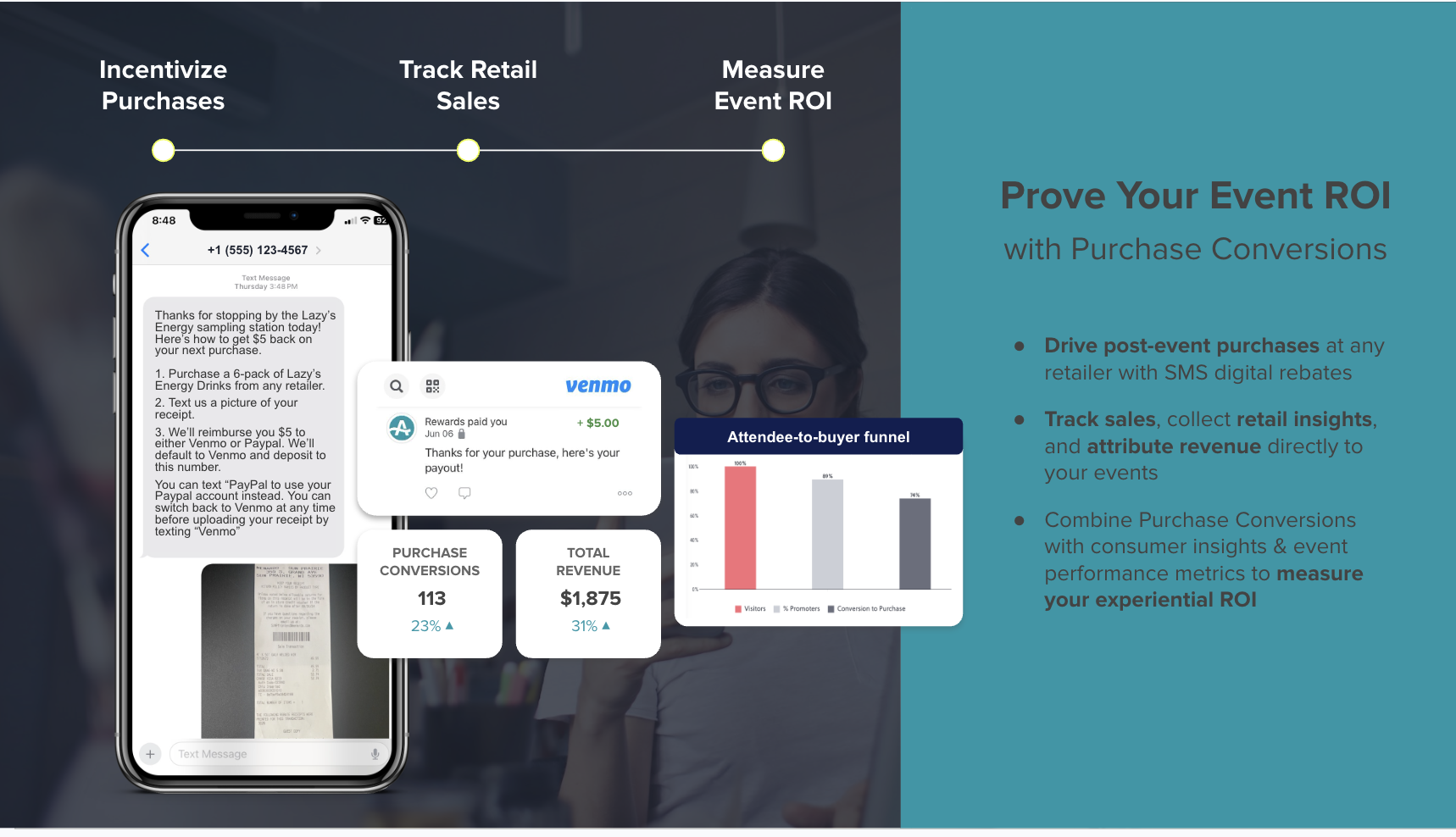
The entire mechanic runs on the receipt. Receipt validation lets brands verify purchases at any retailer without POS integration, and the retailer never has to open an API or share POS data. That structure makes the mechanic deployable across trade accounts at scale. It is also what makes on-premise conversion measurable at all, since a bar tab leaves no other trace. A rebate tied to an identifiable SKU on a bar tab is measurable in a way a depletion report never is.
In a one-month ambassador tasting pilot with a craft brand, 56% of the records collected converted to a bottle purchase. This was an early, small-sample pilot with a single unnamed brand and should not be read as a platform benchmark. It establishes that the mechanic produces a measurable signal where a depletion report produces none.
A sweepstakes variant runs the same data capture and SMS follow-up with a prize entry instead of cash back, such as Coachella tickets rather than a rebate. AnyRoad handles the regulatory compliance around it, including terms and conditions and privacy policies. The FTC's consumer guidance states that it is illegal to require a purchase to enter or increase odds of winning, so a free alternative method of entry is required for any sweepstakes mechanic.
Every one of these mechanics produces a first-party record tied to a receipt-verified purchase. That connection links experiential spend to retail sell-through and replaces the depletion report as the measure of whether an activation worked. For a deeper look at measuring the return, see Ambassador Tasting ROI: The Field Guide to Measuring Sales.
How to Create and Test the QR Code Itself
The rebate mechanic only works if the guest reaches the form in the first place, which makes the physical code a critical link in the chain. A QR code for a tasting check-in should point to a registration URL, because that destination produces a first-party record. Calendar links and homepage links produce a calendar entry and a pageview respectively.
Use a dynamic QR code rather than a static one. A dynamic code lets the destination URL be changed after the code is printed, so if the registration form URL changes or the age-gate logic needs updating, the printed code on the table tent does not need to be reprinted. A static QR code or a fixed URL baked into a PDF or vinyl banner locks the setup into whatever gate design existed on the day the artwork went to print.
Before the tasting, run these tests:
- Scan with both iOS and Android cameras instead of a third-party QR app.
- Test on cellular data, not store Wi-Fi, which may block or throttle the landing page.
- Confirm the landing page loads fast on a phone. Google's Core Web Vitals guidelines recommend a Largest Contentful Paint under 2.5 seconds, and pages that miss this threshold see measurably higher drop-off.
- Print the code large enough to scan from a guest's hand at table height. MightyForms recommends QR codes be at least 100×100 pixels for reliable scanning in varied venue lighting.
- Keep a printed backup and a short vanity URL in case the printed code is damaged.
AnyRoad's Front Desk app supports QR code check-ins on the brand's own hardware and iOS app, so staff can confirm a scan registered rather than relying on the guest's phone screen alone.
Troubleshooting Failed Scans
Testing catches the failures you can predict, and the rest show up at the table. A May 2026 QR TIGER survey found that nearly 4 in 10 users fail to complete a scan, most commonly due to device incompatibility or insufficient code quality (39%) or poor code placement (25%). Plan for failure before the tasting starts. The six failure modes below cover what actually goes wrong at a table, each with its likely cause and the fallback that recovers the record.
- Dead or smudged code: print quality or physical damage is the usual cause, so keep a printed backup and a short vanity URL the guest can type.
- No signal in the store: store Wi-Fi blocking or a dead zone often sits behind this, so test on cellular before the event and keep the registration form lightweight with no large images or video autoplay.
- Guest refuses to fill out the form: friction perception or privacy concern often drives this, so offer the SMS link so they can finish after the tasting and avoid pressure.
- Guest's phone camera will not focus: an older device or cracked camera lens usually causes this, so use a staff device as fallback and have one pre-loaded with the registration URL.
- Duplicate scans: a guest scanning twice or sharing the code creates this, so dedupe on phone number at the platform level.
- Guest is already in the brand's database: a returning customer with an existing profile sits behind this, so match and append rather than create a new record.
Measuring Success
Success at a tasting check-in comes from clear checkpoints rather than arbitrary benchmarks. The metrics that matter for a tasting check-in are:
- Scan-to-completion rate, which shows what share of guests who scanned finished the form
- Share of attendees who opted in to marketing, which defines the usable portion of the record set
- Age-verification completion, which confirms the compliance layer ran
- Rebate redemption rate, which acts as a proxy for purchase conversion and the closest available signal to sell-through without POS access
- Record quality, which shows whether records are landing in the brand's CRM cleanly enough to segment on
AnyRoad's analytics dashboard measures brand affinity, Net Promoter Score, and purchase intent, filterable by experience, location, and demographics. Pinpoint's AI-powered feedback analysis turns open-text survey responses into themes and sentiment drivers, so if guests at one retail account consistently mention price or a competing product, that signal surfaces without manual review.
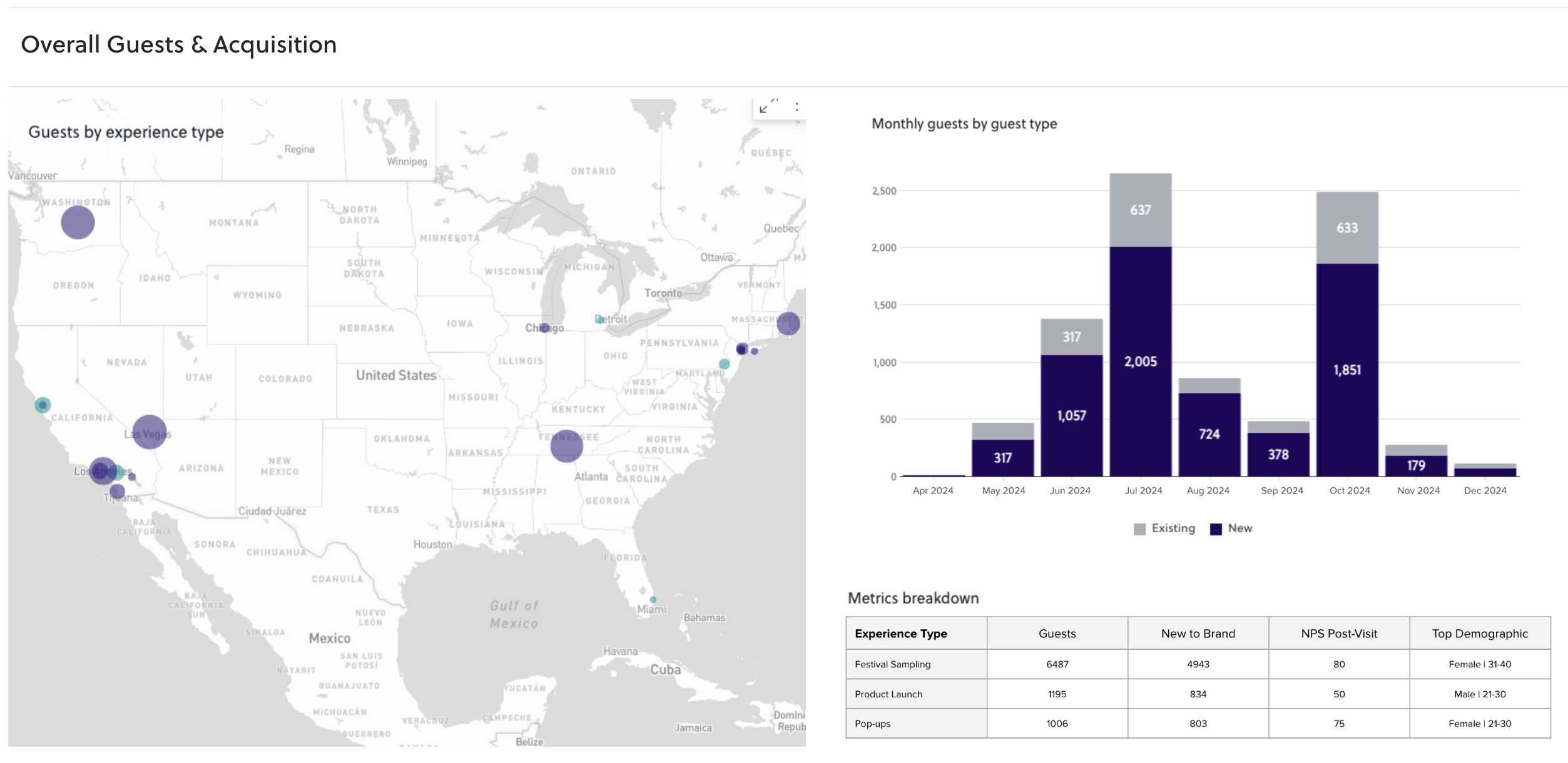
Success at a tasting check-in means the tasting produced records the brand owns, and at least some of them can be tied to a bottle leaving a shelf.
See How AnyRoad Proves Tasting Sales
Advanced Tips
Once the basic scan flow is running cleanly across retail accounts, the records you captured in Measuring Success become the input for retention. The same data that proves a sale can also predict the next one.
Segment the captured records by NPS, spend, and visit frequency to surface the guests most likely to enroll in a club or repeat purchase. AnyRoad's customer view lets brands stratify their audience at a micro level. Instead of following up with every record equally, staff can focus on the guests the data says will convert. A consumer who visits a brand's own tasting room twice is 512% more likely to convert to a paid loyalty enrollment, and the same signal logic applies to repeat engagement at retail.
Use the SMS channel for post-tasting follow-up while the experience is fresh. The rebate SMS is the first touchpoint. A follow-up 48 to 72 hours later, while the tasting memory is still active, becomes the second. American Guerrilla Marketing identifies underinvestment in post-activation follow-up as one of the most consistent failure patterns in experiential programs.
Standardize the same scan flow across every retail account so data is comparable. If one account uses a different form or a different age-gate design, the resulting dataset cannot be segmented or benchmarked across the portfolio.
Layer in gamified purchase conversion tools such as punch cards and sweepstakes entries to drive future retail behavior beyond the first rebate redemption. The same first-party records feed AnyRoad's Lifetime Loyalty suite, including bottle clubs, memberships, and managed CRM, so the tasting becomes the top of a recurring-revenue funnel rather than a one-off activation.
Turn Tasting Table Scans Into Measurable Bottle Sales
The arc of a well-executed ambassador tasting check-in is straightforward. Define the scan flow, capture the right fields, verify age and consent at the scan, attribute the purchase through the receipt-based rebate, test the code before the tasting, and have a fix ready for every failed scan.
AnyRoad is the best experiential marketing platform for ambassador tasting QR code check-in because it captures a consented, age-verified first-party record at the table and ties that record to a receipt-verified purchase without any POS integration at the retail account. A clipboard and a sign-in sheet cannot prove a tasting sold a bottle. Structured execution and clean data are what turn a tasting from a depletion report into measurable sell-through.
Talk to AnyRoad About Retail Tasting ROI
FAQ
What Is Ambassador Tasting QR Code Check-In?
Ambassador tasting QR code check-in is a data capture flow used at brand ambassador tastings inside third-party retail accounts or on-premise venues. A guest scans a QR code at the tasting table with their own phone, lands on a branded registration form, completes age verification and marketing consent, and becomes a first-party record owned by the brand instead of the retailer. The record is captured at the point of the tasting without requiring any integration with the retailer's point-of-sale system. AnyRoad's Live mobile app and Front Desk app support this flow on the brand's own hardware.
What Fields Should the Registration Form Capture?
The core fields are contact details such as name, phone number, and email, date of birth or ID scan for age verification, and an unchecked marketing opt-in with clear channel and purpose disclosure. Beyond those, brands can add a small number of custom questions asked before, during, or after the experience to capture purchase intent, product preference, or occasion data. Keep the total field count low enough to complete standing up with a sample in hand. Research consistently shows that each additional required field reduces form completion, and mobile drop-offs account for the majority of registration abandons. AnyRoad's FullView feature captures data from every attendee in a group, not just the person who initiated the scan.
How Do You Verify Age at a QR Check-In?
Age verification at a tasting check-in runs through the registration form before any marketing data is collected. As covered above, the DISCUS, Beer Institute, and Wine Institute codes all require age affirmation before any data collection. A compliant flow uses an open date-of-birth entry field so the guest actively enters their birth date rather than clicking a single confirmation. A "no" or under-21 answer routes away from the form without collecting any data. AnyRoad's Integrated ID Scanning provides embedded age verification as part of the flow, which goes beyond self-attestation for brands that want a stronger verification layer. The age-gate step is separate from the marketing opt-in, so passing the age screen does not automatically enroll the guest in marketing communications.
Do You Need POS Integration at the Retailer to Track Purchases?
POS integration at the retailer is not required to track purchases from a tasting. The receipt-rebate flow described above, including SMS offer, photo of receipt, AI SKU match, and Venmo or PayPal payout, is what replaces a POS feed. This works at any retailer, including national chains, regional grocers, independent liquor stores, and on-premise bars, because the receipt is the proof of purchase. A sweepstakes variant runs the same mechanic with a prize entry instead of cash back. The pilot result cited earlier, with 56% of records converting to a purchase, is a small-sample signal rather than a benchmark, but it illustrates the kind of attribution a depletion report cannot produce.
What Should Staff Do When a Guest's QR Scan Does Not Work?
Staff should work through a short escalation sequence rather than retrying the same failed scan. First, ask the guest to increase screen brightness and clean the camera lens, since dim screens and blue-light filters are common scan failure causes. If the code still will not scan, offer the guest a short vanity URL they can type directly into their browser. If the guest's phone is the problem, such as a cracked camera or older device, use a staff device pre-loaded with the registration URL. If the guest declines to complete the form on the spot, offer the SMS link so they can finish after the tasting. Keep a printed backup of the QR code and vanity URL at the table at all times. The goal is to capture the record without creating friction that ends the conversation, because a guest who finishes the form after the tasting is better than a guest who walks away when the scan fails and no fallback exists.
Can the Same QR Check-In Be Used for Wine Tasting QR Code Check-In and Spirits Tastings?
The same QR check-in framework works for wine tasting QR code check-in and spirits tastings. The scan flow, age verification requirements, and receipt-based attribution mechanic are consistent across categories. The DISCUS, Beer Institute, and Wine Institute codes all require age affirmation before data collection, and the receipt-based rebate mechanic works for any eligible SKU regardless of category. The primary differences sit in the consent language, which should reference the specific brand and product category, and in any state-specific rules that apply to the tasting location. California, for example, has specific rules under AB 1991 for market research tastings that restrict how data collected at those tastings can be used, and data from a statutory market-research tasting cannot be repurposed for marketing or advertising. Standard ambassador tastings at retail accounts operate under different rules. AnyRoad's configurable registration experience allows brands to customize the form, consent language, and custom questions by activation type, so the same platform supports both wine and spirits programs.
How Do You Create and Test the QR Code?
Create a dynamic QR code pointing to the registration URL, because that destination produces a first-party record and can be updated without reprinting the physical code. Before the tasting, scan the code with both iOS and Android cameras on cellular data instead of store Wi-Fi, confirm the landing page loads in under 2.5 seconds on a phone, and verify the age gate and form fields appear correctly. Print the code at a minimum of 100×100 pixels for reliable scanning in varied venue lighting, and large enough to scan from a guest's hand at table height. Keep a printed backup and a short vanity URL at the table as a fallback. AnyRoad's Front Desk app allows staff to confirm a scan registered on the brand's own device, which provides a second confirmation layer beyond the guest's phone screen.
How Do You Measure Whether the Check-In Worked?
Measurement relies on the same framework described in Measuring Success. The five checkpoints in that section form the scorecard, and the dashboard and Pinpoint analysis described there are how you read them. A tasting check-in has worked when it produced records the brand owns and at least some of them can be tied to a bottle leaving a shelf, which is a standard a depletion report cannot meet.